
Project Management
12137I. Function Overview
The project management function is the core module of the Jianghu PM system, allowing users to comprehensively manage all projects, whether they are currently ongoing, archived, or moved to the recycle bin. Through this function, users can quickly view key information such as project completion status and deadlines, enabling effective monitoring of project progress and status.
II. Function Entry
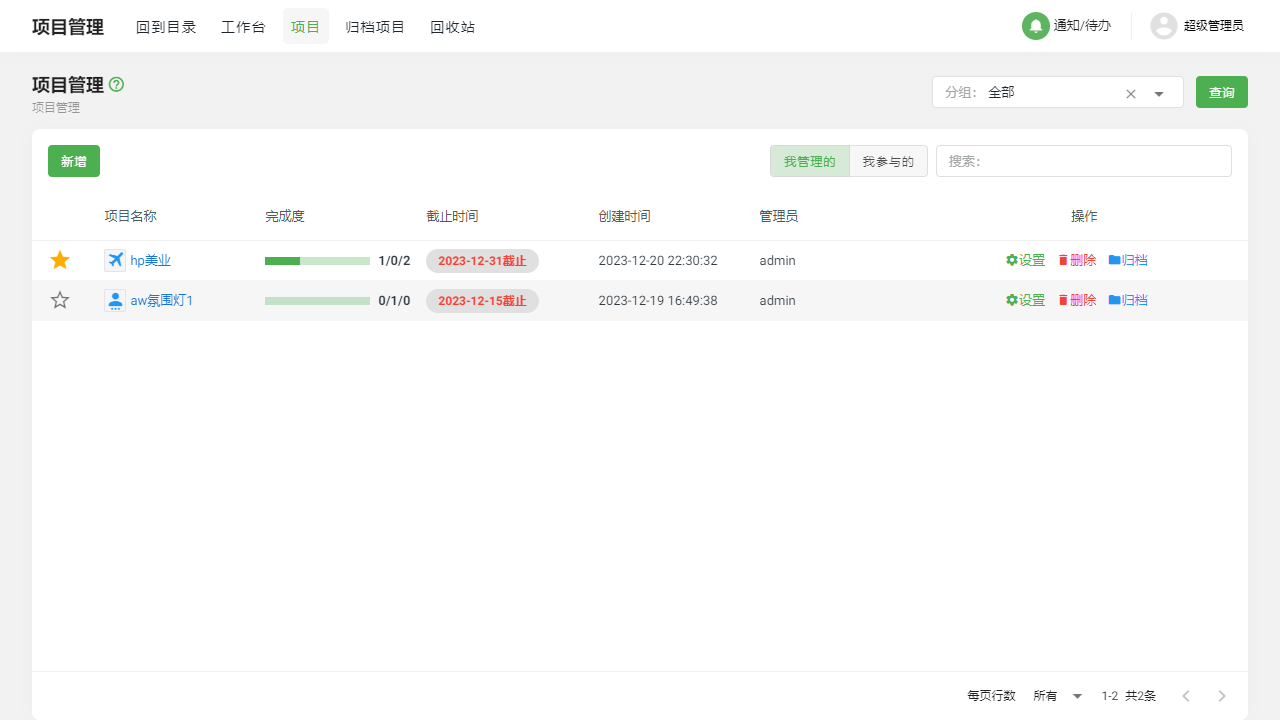
Users can easily access the project list page by clicking the [Projects] tab in the top navigation bar of the system, allowing them to start managing various projects.
III. Function Details
1. Project List
On the project list page, users can clearly see all the projects they manage or participate in. These projects are distinctly categorized as "Managed by Me" and "Participated by Me," making it easy for users to quickly locate relevant projects. Additionally, users can perform operations such as deleting, archiving, or modifying information about projects to meet diverse project management needs.
2. Archived Projects
The archived projects function allows users to view a list of projects that have been archived. These projects may be completed or temporarily not needing attention. By archiving, users can keep their project list tidy and organized. Moreover, if users need to reactivate a project, they can easily select and restore it from the archived projects.
3. Recycle Bin Projects
The recycle bin projects function provides users with a secure space to manage deleted projects. Here, users can find previously deleted projects and decide whether to permanently delete them or restore them. This function effectively prevents data loss due to accidental deletions.
IV. Notes
- When performing operations such as deleting, archiving, or restoring projects, please confirm the target of the operation to avoid data loss or confusion due to mistakes.
- Regularly review and manage the project list to ensure timely updates and effective management of projects.
- For important projects, it is recommended to regularly back up relevant data to prevent data loss due to unforeseen circumstances.
V. Frequently Asked Questions and Answers
Q: How can I restore a mistakenly deleted project?
A: If you accidentally deleted a project, you can find it in the recycle bin projects and choose to restore it. Please note that once restored, it will return to the project list.
Q: Can I permanently delete projects in the recycle bin?
A: Yes, you can choose to permanently delete a project in the recycle bin. However, please note that once this operation is performed, the project data cannot be recovered, so proceed with caution.
Q: Can archived projects be reactivated?
A: Of course. In the archived projects list, you can find and select the project you need to restore, and then restore it to the project list. After restoration, you can continue to manage and update that project.