
Workbench
12137I. Function Overview
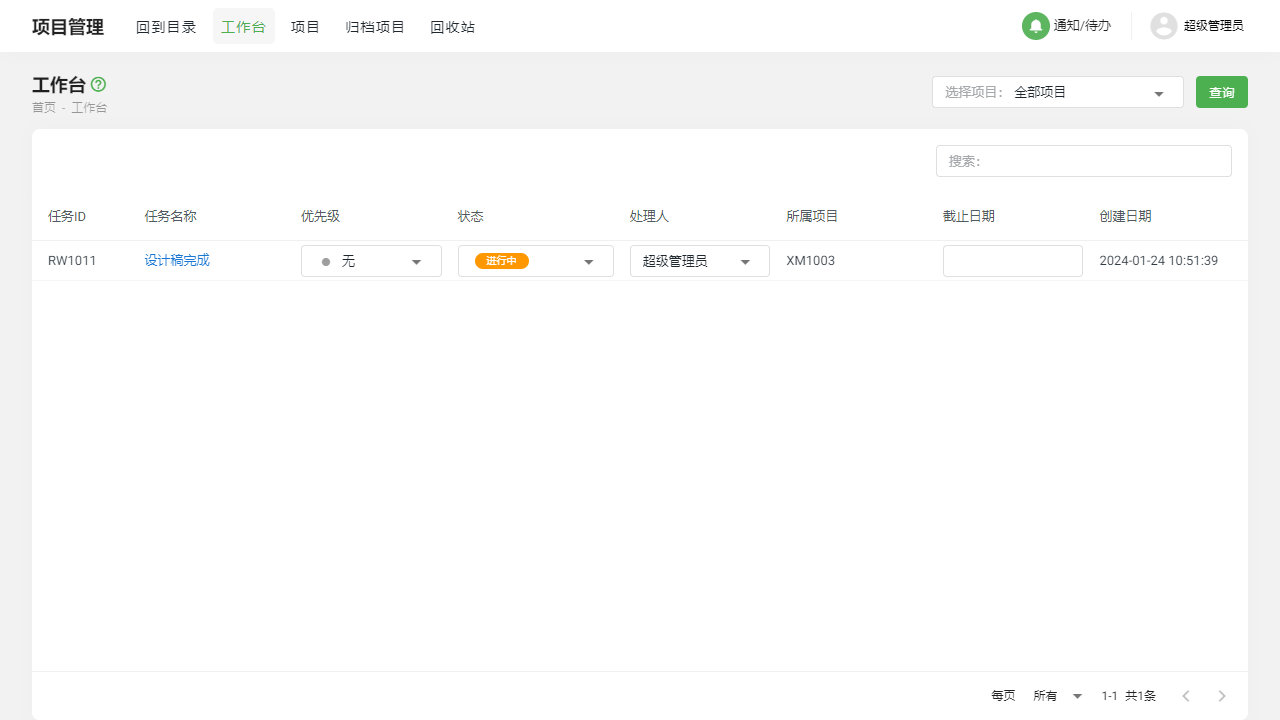
The workbench is one of the core features of the Jianghu PM system, providing users with a centralized platform to manage and view ongoing tasks. Here, users can intuitively see all tasks assigned to them that are currently in progress, facilitating quick tracking and management of tasks. Through the workbench, users can easily modify key task information and view specific task details at any time, ensuring the smooth progress of projects.
II. Function Entry
To help users quickly access the workbench, simply click on the [Workbench] option in the top navigation bar of the system to jump to the workbench page.
III. Function Details
1. Task List
In the task list of the workbench, users can clearly see all tasks assigned to them that are currently in progress. Each task displays key information such as task name, due date, progress, etc. Additionally, users can utilize quick actions to directly modify key task information within the workbench, such as updating progress or adjusting due dates, without needing to navigate to the task detail page, significantly improving work efficiency.
2. Task Details
When users need to view detailed information about a task, they can simply click on the corresponding task in the task list to quickly enter the task detail page. Here, users can view all content related to the task, including task description, responsible person, reference documents, comments, etc. Furthermore, users can perform more in-depth editing and management of the task on the detail page, such as adding subtasks or uploading attachments.
IV. Precautions
- When using the workbench, please ensure a stable internet connection to avoid data loss or synchronization issues.
- When modifying task information, please carefully check the changes to ensure the accuracy of the information.
- When viewing task details, please be mindful of protecting sensitive information to prevent data leakage.
V. Frequently Asked Questions and Answers
Q: I cannot see the tasks assigned to me on the workbench. What could be the reason?
A: Please confirm whether you have been assigned tasks and that the status of the tasks is "In Progress." If the task status is not "In Progress," or if you have not been assigned any tasks, you will not see the relevant tasks on the workbench.
Q: I modified the key information of a task, but it seems that others cannot see my changes. What should I do?
A: Please confirm whether your changes have been successfully saved and that your internet connection is stable. If the changes have been successfully saved but others still cannot see them, it may be a system cache issue; refreshing the page or trying again later is recommended.
Q: How do I add attachments in the task details?
A: On the task detail page, you will find an option to "Upload Attachment." Click on this option, follow the prompts to select the file you want to upload, and wait for the upload to complete. Please be aware of file size and format restrictions.