
Chat
12125I. Function Overview
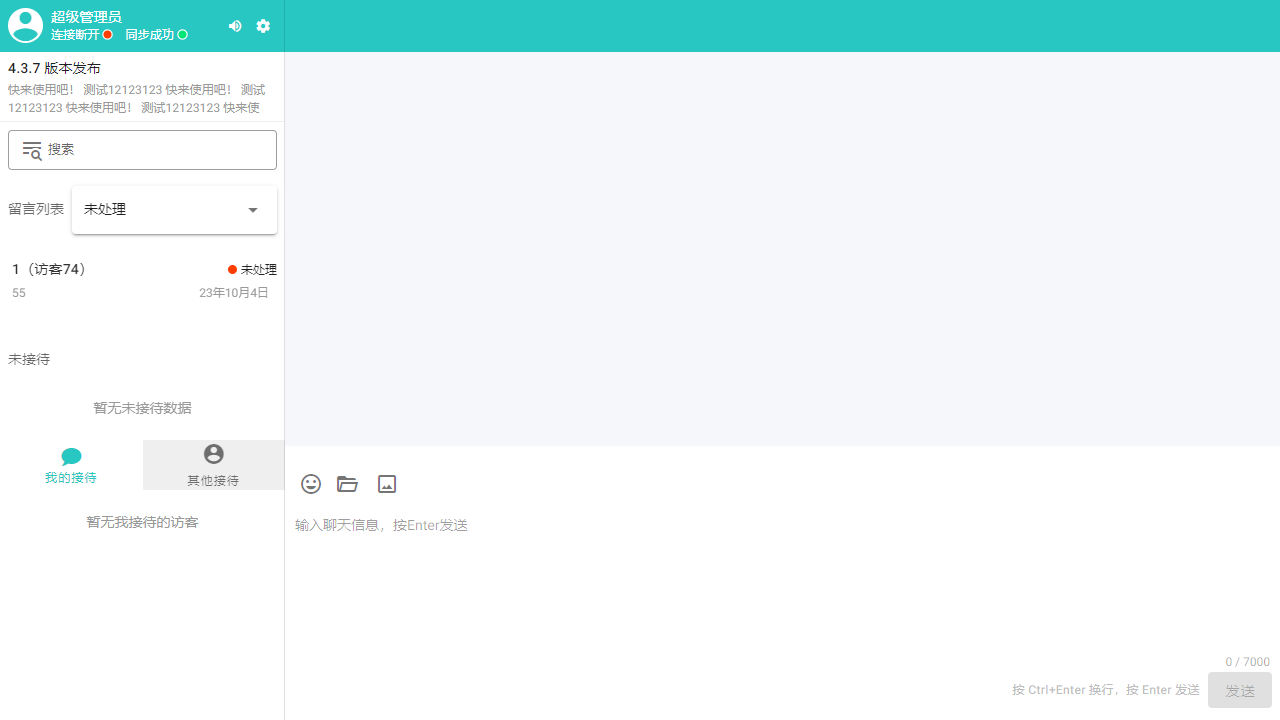
The user end 【Chat】 page of the Jianghu Customer Service System is the main interface for users to communicate with our intelligent customer service or human customer service. Users can send messages, provide feedback, and receive replies and solutions from customer service on this page. Through this feature, we aim to provide efficient and convenient customer acquisition, sales, and service support for every enterprise using the Jianghu Customer Service System.
II. Function Entry
After logging into the Jianghu Customer Service System, users will default to the 【Chat】 page. Additionally, if users navigate to other pages during use, they can quickly return to the chat page by clicking the 【Chat】 option in the background to continue communicating with customer service.
III. Function Details
1. Message List
Users can view all the messages they have sent in the message list. This list supports filtering messages by status, including "In Contact" and "Unprocessed," making it easier for users to quickly locate messages that require their attention.
2. Reception List
The reception list displays the customer service personnel currently providing service to users, as well as other available customer service personnel. Users can quickly search and select suitable customer service representatives for consultation in this list. Additionally, the list supports displaying the online status of customer service personnel, allowing users to understand the real-time work situation of customer service.
3. Basic Information Configuration
In the settings area at the top of the chat page, users can click the Icon to manage personal information, including modifying their avatar, password, etc. This feature aims to provide users with a personalized experience and ensure account security.
4. Message Support
The chat function of the Jianghu Customer Service System supports sending various types of messages, including text, emojis, attachments, and images. Users can choose the appropriate message type to send based on their needs, allowing them to express their questions and requirements more intuitively. The system also supports real-time message notifications and chat history saving functions, ensuring seamless and traceable communication between users and customer service.
IV. Notes
- When using the chat function, please ensure a stable internet connection to guarantee real-time message transmission.
- Please respect customer service personnel and avoid using inappropriate language or engaging in malicious harassment.
- When sending attachments or images, please pay attention to file size and format restrictions to avoid sending failures or affecting system performance.
- If you encounter any problems or concerns, please contact our technical support team in a timely manner for assistance.
V. Frequently Asked Questions and Answers
Q1: How can I view the messages I sent previously?
A1: You can view all the messages you sent previously in the message list. By filtering different statuses ("In Contact" or "Unprocessed"), you can quickly find the messages that require your attention.
Q2: How can I contact a specific customer service representative?
A2: You can search and select a suitable customer service representative for consultation in the reception list. If that representative is currently offline or busy, you can also choose other available customer service personnel.
Q3: How can I modify my personal information?
A3: In the settings area at the top of the chat page, click the Icon to enter the personal information management page. Here, you can modify your avatar, password, and other personal information.
Q4: What types of messages can I send?
A4: The chat function of the Jianghu Customer Service System supports sending various types of messages, including text, emojis, attachments, and images. You can choose the appropriate message type to send based on your needs.