
Message Management
12125I. Function Overview
On the 【Message Management】 page of the management portal, administrators or users with relevant permissions can conveniently view, process, and analyze user messages. This feature aims to help businesses respond to user feedback in a timely manner, improve customer satisfaction, and optimize service processes.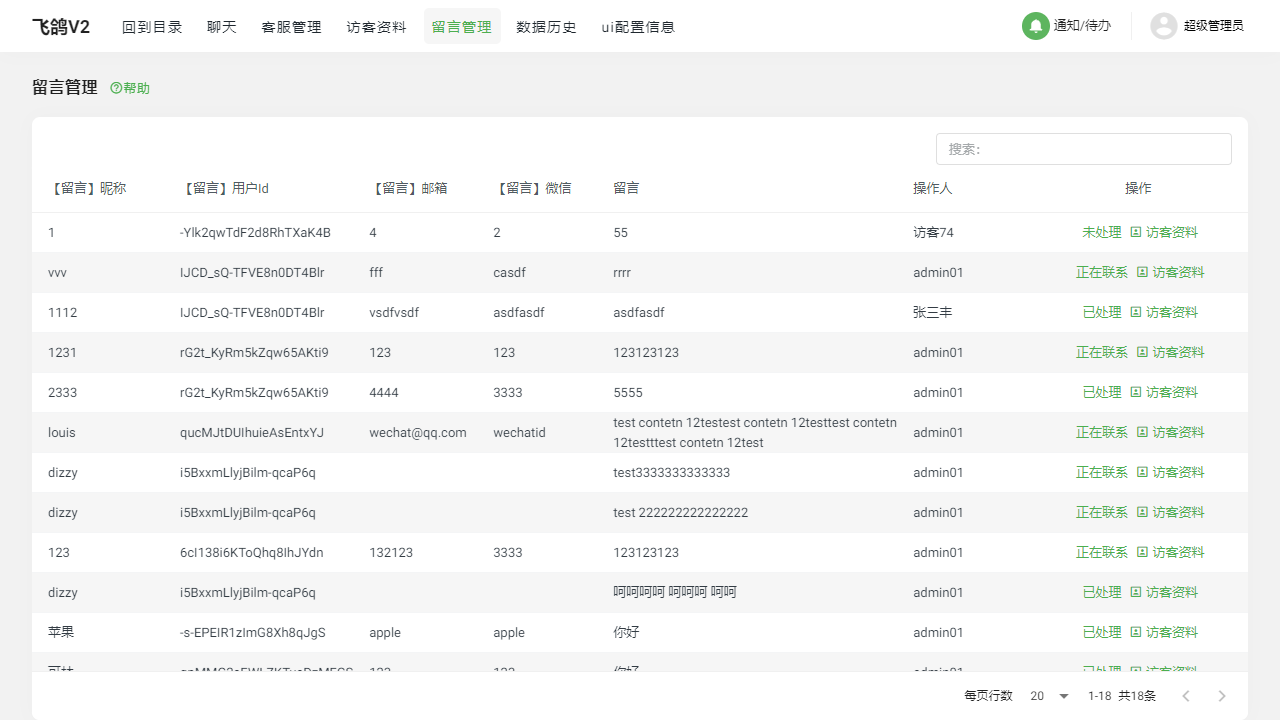
II. Function Entry
After logging into the management portal, click on the 【Message Management】 menu at the top to enter the message management page.
III. Function Details
1. Message List
The message list displays all user message information, including message content, message time, and message sender. Administrators can filter and sort messages by conditions such as time and status to process user feedback more efficiently.
2. Visitor Information
In the message list, clicking on a specific visitor's username allows you to view that visitor's detailed information. This helps administrators better understand the background and needs of the message sender, thereby providing more accurate services.
3. Modify Message Status
Administrators can modify the status of messages based on processing progress, such as "Pending," "In Process," "Processed," etc. This helps track and manage the handling of messages, ensuring that each message receives a timely and effective response.
IV. Notes
- Regularly check the message list to ensure timely processing of user feedback.
- When handling messages, pay attention to protecting user privacy and avoid disclosing sensitive information.
- Provide personalized and professional replies and services based on message content and visitor information.
- Keep the message status updated in real-time to track and manage processing progress.
V. Frequently Asked Questions and Answers
Q1: How can I quickly find messages from a specific user?
A1: On the message list page, you can use the search function to find messages from a specific user. Enter the username or keywords to quickly locate the relevant messages.
Q2: How should I handle messages that involve sensitive information?
A2: If a user message contains sensitive information, administrators should handle it with caution. First, ensure that this information is not disclosed to unrelated parties. Second, you can contact the user and inform them to provide sensitive information through a more secure method (such as phone or email). Finally, promptly delete or hide messages containing sensitive information to prevent information leakage.
Q3: How can I ensure that every message is processed in a timely manner?
A3: Administrators can establish a message processing workflow and set clear processing deadlines. For example, all messages should be responded to within 24 hours and user issues resolved within 72 hours. Additionally, using the message status feature to track and manage processing progress is also an effective method. By regularly checking and processing "Pending" messages in the message list, you can ensure that every message is processed in a timely manner.