
Data Management
12125I. Function Overview
The management portal's [Data Management] page provides functionalities for managing historical operation records and data versions. Through this page, administrators can conveniently view, track, and audit various operations in the backend, ensuring data integrity and security.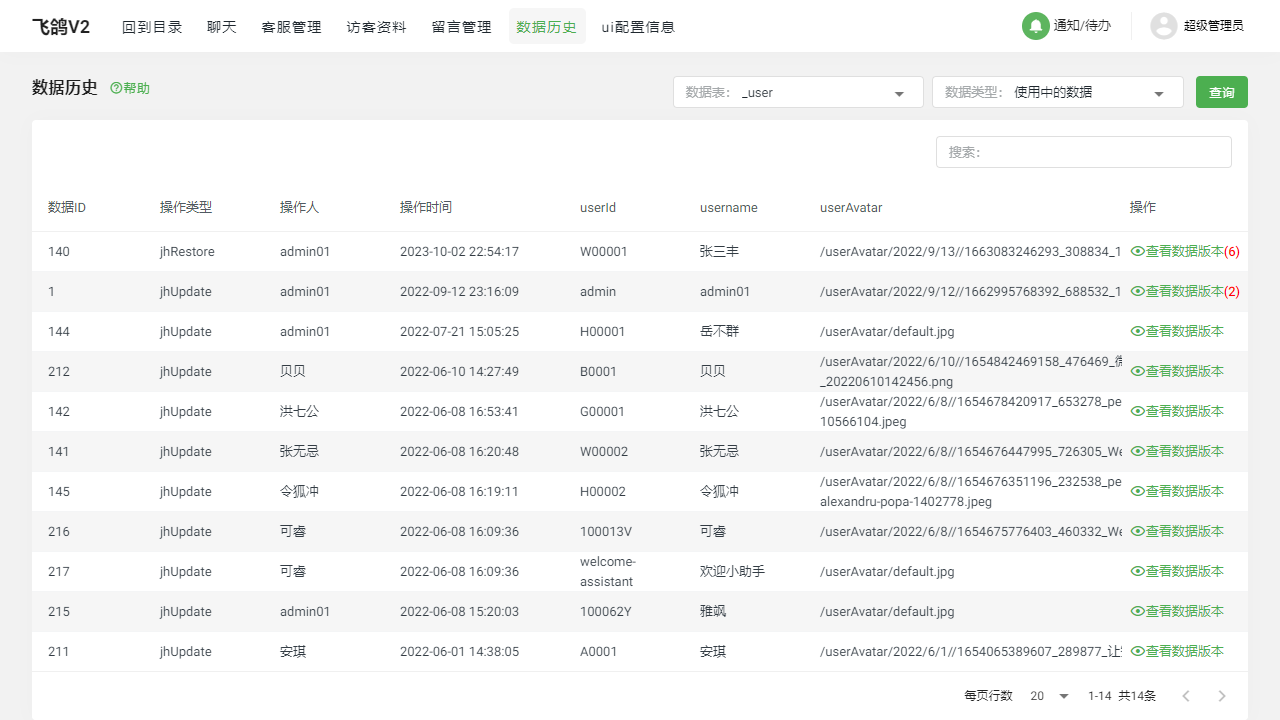
II. Function Entry
After logging into the management portal, click on the [Data History] menu at the top to quickly access the data management page.
III. Function Details
1. Data History List
The data history list displays all operation records conducted in the management backend, including operation time, operation type, operation object, and the user performing the operation. Administrators can quickly locate specific time periods or specific users' operation records using the filtering and sorting features for auditing or backtracking purposes.
2. View Data Versions
The data management page also supports viewing different versions of the data. When data changes occur, the system automatically saves the previous version of the data to allow administrators to restore or compare when necessary. By clicking on a specific record in the data history list, administrators can view the corresponding data version for that record and understand the details of the data changes.
IV. Notes
- Regularly audit the data history to ensure all operations comply with standards and security requirements.
- It is recommended to back up relevant data before making any data changes to prevent unexpected situations.
- If any abnormal operations or data leakage risks are detected, they should be reported immediately, and appropriate security measures should be taken.
V. Frequently Asked Questions and Answers
Q1: How can I view the operation records of a specific user?
A1: In the data history list, you can use the filtering feature to select "Operation User" as a specific user to view all operation records for that user.
Q2: How long are data versions saved? Can they be manually deleted?
A2: The retention period for data versions depends on the system settings and policies. Generally, the system retains data versions for a certain period for recovery and auditing purposes. Manual deletion of data versions is not recommended to avoid losing important historical data. If storage space needs to be freed, please contact the system administrator or technical support team for assistance.
Q3: What should I do if I find abnormal operations?
A3: If you discover abnormal operations in the data history list, such as unauthorized data modifications or deletions, you should report them immediately to the relevant personnel or security team. Additionally, you can use the data version feature to restore the data state to before the abnormal operation to minimize loss and risk.