
Visitor Management
12125I. Function Overview
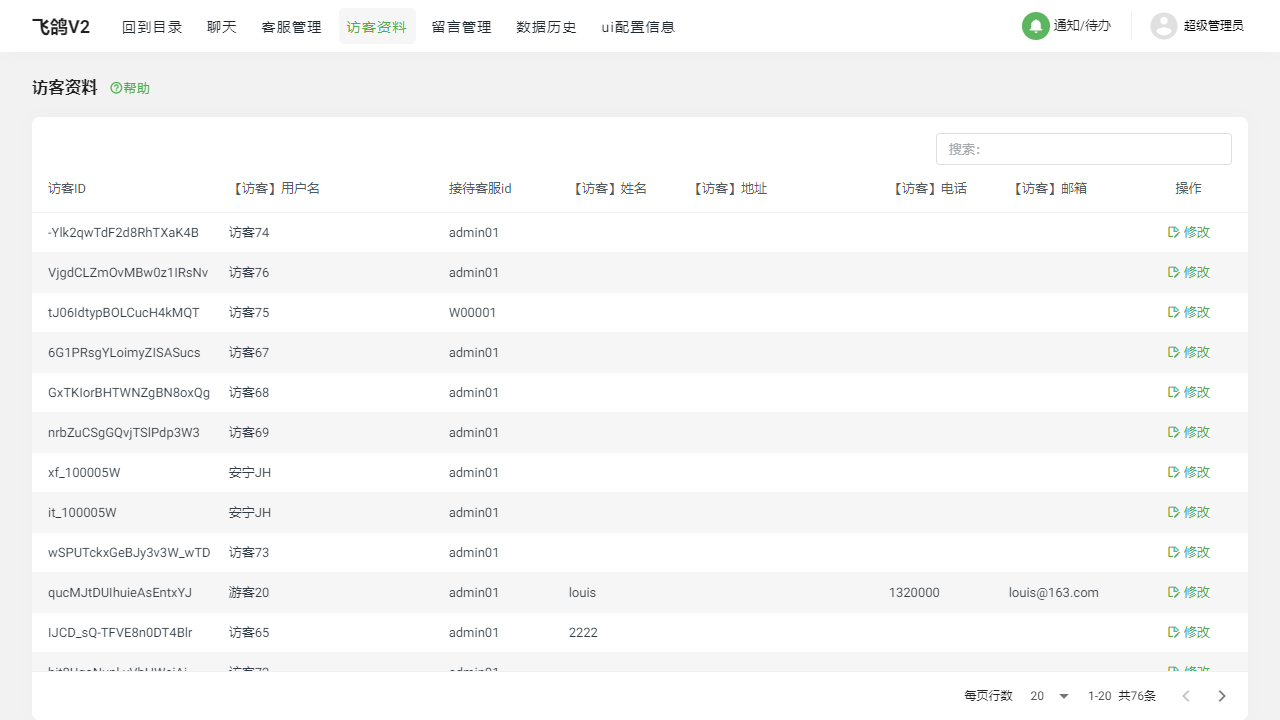
On the management portal's [Visitor Information] page, administrators or users with specific permissions can view, edit, and manage visitor information. This feature not only helps businesses better understand and serve their customers but also supports real-time updates and corrections of visitor data, ensuring the accuracy and timeliness of customer information.
II. Function Entry
After logging into the management portal, click on the [Visitor Information] menu at the top to quickly access the visitor management page.
III. Function Details
1. Visitor List
In the visitor list, you can clearly see key information for each visitor, including username, the customer service representative they interacted with, and visit time. This helps administrators or customer service personnel quickly understand the basic situation and reception status of visitors for more efficient service.
2. Modify Visitor Information
If there is an error in the visitor information or it needs to be updated, administrators can directly modify it on the visitor information page. Click the edit button for the corresponding visitor to enter edit mode and make adjustments to the visitor's information. After making changes, remember to save them to ensure the accuracy of the information.
IV. Notes
- When modifying visitor information, please ensure that the information entered is accurate to avoid service errors or customer dissatisfaction due to incorrect information.
- Modifications to sensitive information, such as contact details and addresses, should be handled with caution, ensuring compliance with relevant laws, regulations, and privacy policies.
- Regularly check and update visitor information to keep it current, improving the quality and efficiency of customer service.
V. Frequently Asked Questions and Answers
Q1: How can I quickly find specific visitor information?
A1: In the visitor list, you can use the search function to quickly locate specific visitor information. Enter the visitor's username, contact information, or other key details to quickly retrieve the relevant visitor.
Q2: After modifying visitor information, do I need to log in again or refresh the page to see the changes?
A2: Generally, changes to visitor information take effect immediately without needing to log in again or refresh the page. However, to ensure the real-time accuracy of the information, it is recommended to confirm that the changes have been successfully saved and displayed on the page after making important modifications.
Q3: What should I do if I accidentally delete a visitor's information?
A3: If you accidentally delete a visitor's information, it is advisable to immediately contact the technical support team. Depending on the system's backup and recovery strategy, there may be a chance to restore the deleted data. However, please note that data recovery may not be 100% reliable, so it is essential to operate cautiously to avoid unnecessary data loss.