
Notification
12134I. Function Overview
The notification management feature provides a centralized notification center for the Jianghu OA system, used to manage all notifications on the platform. These notifications include, but are not limited to, announcement notifications, task approval log notifications, and notifications from other applications. Through this feature, users can timely receive various important information within the system.
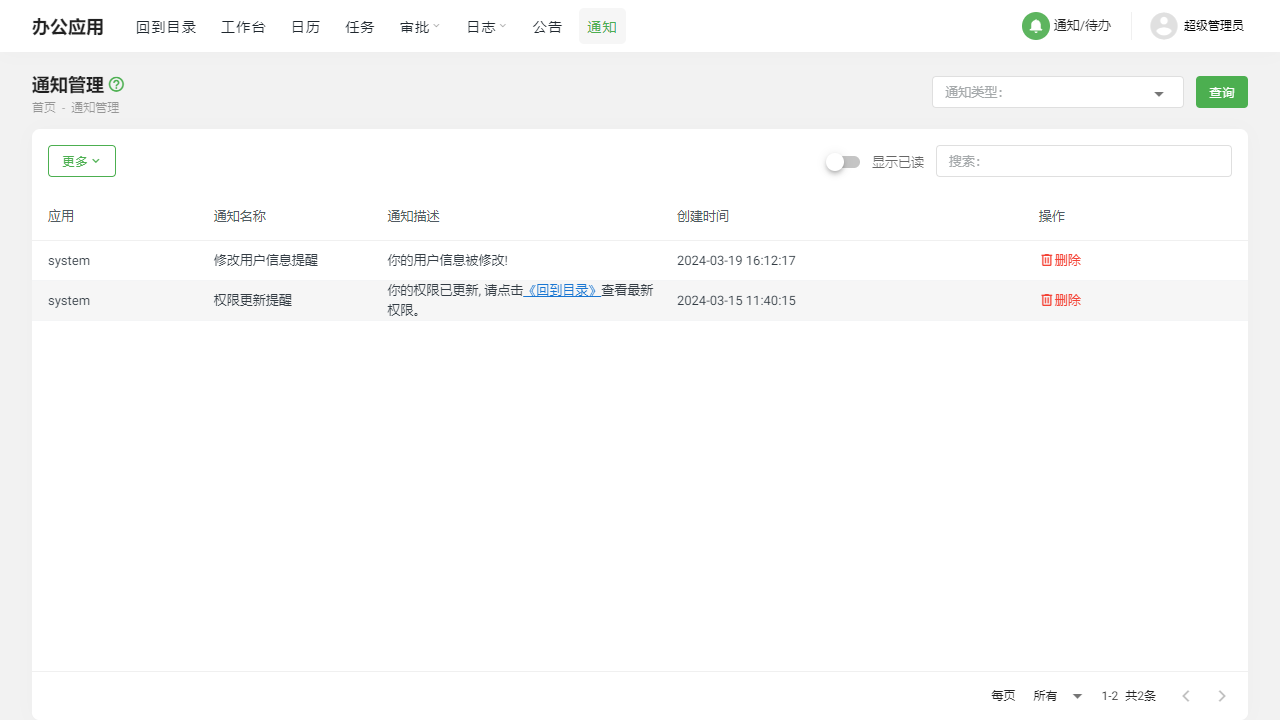
II. Function Entry
Users can quickly access the notification management page by clicking the [Notification] option in the top navigation bar of the system.
III. Detailed Function List
Create Announcement
- Users can use this feature to create a new announcement notification.
- During the creation process, users can edit the content of the announcement, set the release time, and select the recipient group, etc.
Preview Announcement
- Before officially publishing the announcement, users can use the preview feature to view the display effect of the announcement.
- This helps ensure that the format and content of the announcement meet expectations, avoiding errors or omissions after publication.
Notification List
- Users can view all received notifications here, including read and unread notifications.
- It provides convenient search and filter functions to help users quickly find specific notifications.
- Users can choose to delete notifications that are no longer needed or click to view the detailed content of the notifications.
IV. Notes
- When creating an announcement, please ensure the accuracy and timeliness of the announcement content to avoid unnecessary misunderstandings or confusion caused by incorrect or outdated information.
- Regularly check the notification list to ensure timely processing and response to various notifications, maintaining a smooth workflow.
- Before deleting a notification, please confirm whether it is no longer needed to prevent the accidental deletion of important information.
V. Frequently Asked Questions and Answers
Q: How can I ensure that the announcement accurately reaches the target audience?
A: When creating an announcement, please carefully select the recipient group and confirm that the release time and content of the announcement meet expectations. The preview feature can help you check the display effect of the announcement, ensuring accurate information delivery.
Q: Can I recover deleted notifications?
A: Generally, deleted notifications cannot be directly recovered. If you need to view the content of deleted notifications, it is recommended to contact the system administrator or technical support team for assistance. Additionally, it is advisable to regularly back up important notifications to prevent data loss.
Q: How can I mark notifications as read or unread?
A: In the notification list, there is usually an option to mark notifications as read or unread. Users can change the reading status of notifications by clicking the corresponding button. This helps users better manage their notifications and avoid missing important information.
Q: Can I customize the reminder method for notifications?
A: Depending on the specific settings of the system, users may be able to customize the reminder method for notifications to some extent, such as email reminders, in-site message reminders, etc. Please refer to the system help documentation or contact the system administrator for more details.