
Employee Management
12110I. Function Overview
The employee management function is a core module of the Jianghu HR management system, covering the entire lifecycle management from employee onboarding to offboarding. Through this function, users can easily add and modify employee information, process resignation requests, view contract expiration reminders, and export employee information, among other tasks. This function aims to improve the efficiency of the HR department and ensure the accuracy and timeliness of employee information.
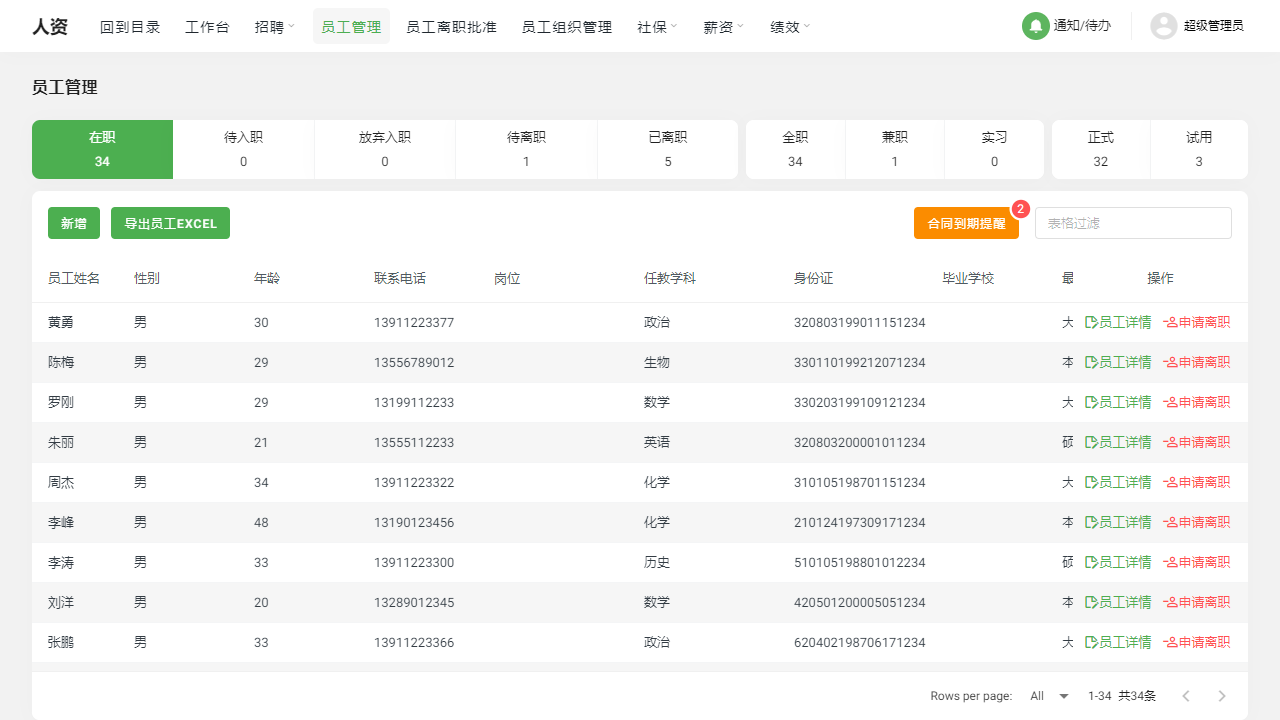
II. Function Entry
Users can quickly access the employee management page by clicking on the [Employee Management] option at the top of the page to start managing the company's employee information.
III. Function Details
Add Employee
- Users can click the "Add Employee" button to fill in the basic information of the employee, such as name, gender, date of birth, contact information, etc.
- After adding the employee information, the system will automatically generate an employee ID and add it to the employee list.
Employee Details
- In the employee list, users can click on any employee's name or ID to view detailed information about that employee.
- On the employee details page, users can modify the employee's basic information, adjust salary and social security settings, and upload and manage employee document attachments.
Apply for Resignation
- Employees can submit a resignation request in the system, which will automatically be transferred to the resignation request list.
- HR can review the resignation request and approve or reject it based on the actual situation.
Contract Expiration Reminder
- The system will automatically detect the expiration date of the employee's contract and issue reminders before the contract expires.
- HR can communicate with employees in a timely manner regarding contract renewal or adjustments based on the reminders.
Export Employees
- Users can export the employee list as needed, supporting formats such as Excel and CSV.
- The exported employee list can be used for data analysis, report generation, and other scenarios.
Employee List: Filter by Status
- The employee list supports filtering by status, such as "Active," "Resigned," "Probation," etc.
- Users can select different statuses to filter based on actual needs for better management of employee information.
Employee Resignation List: Approve or Reject Employee Resignation Requests
- In the resignation request list, users can view all submitted resignation requests.
- HR can review the resignation requests and approve or reject them based on the actual situation. Once approved, the employee's resignation date and reason will be recorded and updated in the employee details.
IV. Notes
- When adding or modifying employee information, please ensure the accuracy and completeness of the information filled in to avoid affecting subsequent employee management and payroll operations.
- Please regularly check contract expiration reminders to ensure timely handling of contract renewals or adjustments to avoid contract disputes.
- When exporting the employee list, please pay attention to protecting employee privacy to avoid disclosing sensitive information.
V. Frequently Asked Questions and Answers
Q: How can I modify an employee's basic information?
- A: On the employee details page, users can find the "Modify Information" option and click to enter the modification page. On this page, users can modify the employee's basic information and save the changes.
Q: Can an employee resubmit a resignation request after it has been rejected?
- A: Yes, if an employee's resignation request is rejected, they can resubmit the resignation request in the system. HR will review the new request again.
Q: How does the contract expiration reminder work?
- A: The system automatically detects the expiration date of the employee's contract and issues reminders within a certain period before expiration (e.g., 30 days, 60 days, etc.). This helps HR communicate with employees in a timely manner regarding contract renewals or adjustments. The specific reminder time can be configured in the system settings.