
Recruitment Management
12110I. Function Overview
The recruitment management function is an important service within the Jianghu HR management system, aimed at helping enterprises quickly recruit suitable employees through systematic and efficient processes. By posting job vacancies, these positions are displayed on the web to attract job seekers to submit their resumes. HR can directly view the list of submitted resumes in the system, filter suitable candidates for interviews, thereby greatly simplifying the recruitment process and improving recruitment efficiency.
II. Function Entry
Users can easily access the recruitment management page by clicking the [Recruitment] tab at the top of the page to start posting and managing job vacancies.
III. Function Details
Add/Edit Job Information
- Users can click the "Add Job" button to post a new job vacancy.
- On the job posting page, fill in key information such as job title, job description, and job requirements.
- After the job is posted, users can modify the job information at any time to ensure the accuracy and timeliness of the recruitment information.
View Job Candidates
- On the recruitment management page, users can view the candidate list for each job position.
- The candidate list is sorted by resume submission time, resume status, etc., making it easy for users to quickly find suitable candidates.
Recruitment Page
- The recruitment page displays all job vacancies currently posted by the company.
- Job seekers can click on job details to understand the specific requirements and company information, and directly submit their resumes online.
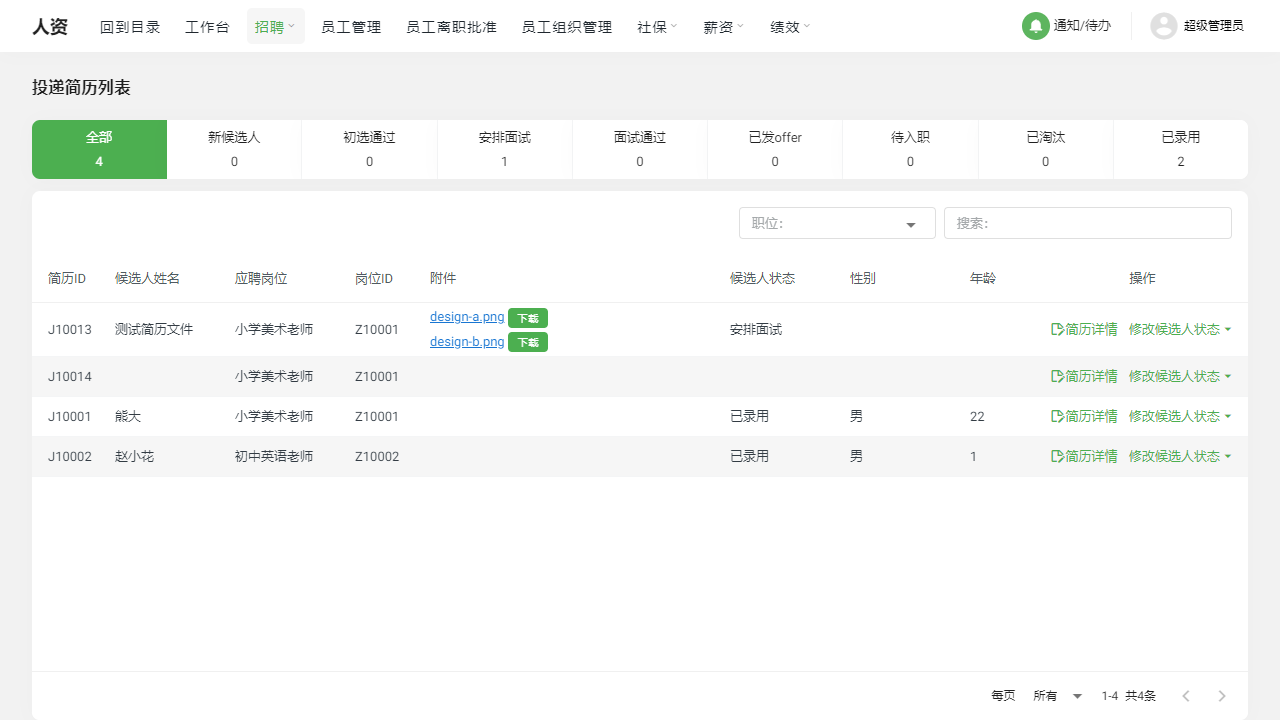
Resume List
- The resume list page displays all submitted resumes, and users can filter based on status, position, submission time, and other criteria.
- Users can batch process resumes, such as modifying candidate status and scheduling interviews, greatly improving work efficiency.
Resume Details
- On the resume details page, users can view detailed information about candidates, including personal information, educational background, work experience, etc.
- Users can also add interview records and evaluations on this page to better track and manage candidates.
IV. Notes
- When posting job vacancies, please ensure the accuracy and clarity of the job description and requirements to attract suitable candidates.
- Please regularly review and process submitted resumes to ensure timely responses to candidates and maintain a smooth recruitment process.
- When viewing resume details, please pay attention to protecting candidate privacy and avoid disclosing personal information.
V. Frequently Asked Questions and Answers
Q: How do I modify the information of a published job?
- A: Find the job that needs to be modified on the recruitment management page and click the "Edit" button to enter the job information editing page for modifications.
Q: How do I view all candidates for a specific job?
- A: Select the corresponding job on the recruitment management page and click "View Candidates" to see the list of all candidates for that position.
Q: What do the resume statuses in the resume list mean?
- A: Resume statuses include "Pending", "Processed", "Rejected", "Hired", etc., representing different stages and outcomes of handling candidate resumes. Users can modify the resume status as needed to track the recruitment process.
Q: How do I add interview records on the resume details page?
- A: Find the "Interview Records" section on the resume details page, click the "Add Interview Record" button to input interview-related information and save it. This will help users track candidates' interview situations and make more informed recruitment decisions.