
Organization Management
12110I. Function Overview
The employee organization management function is designed to help enterprises build and manage their internal organizational structure. Through this function, users can easily create, manage, and adjust the hierarchy of the organization, while adding new employees or sub-organizations at each organizational level. Additionally, this function supports information modification and deletion operations for employees within the organization, meeting the needs of enterprises for flexible personnel allocation and organizational structure adjustments.
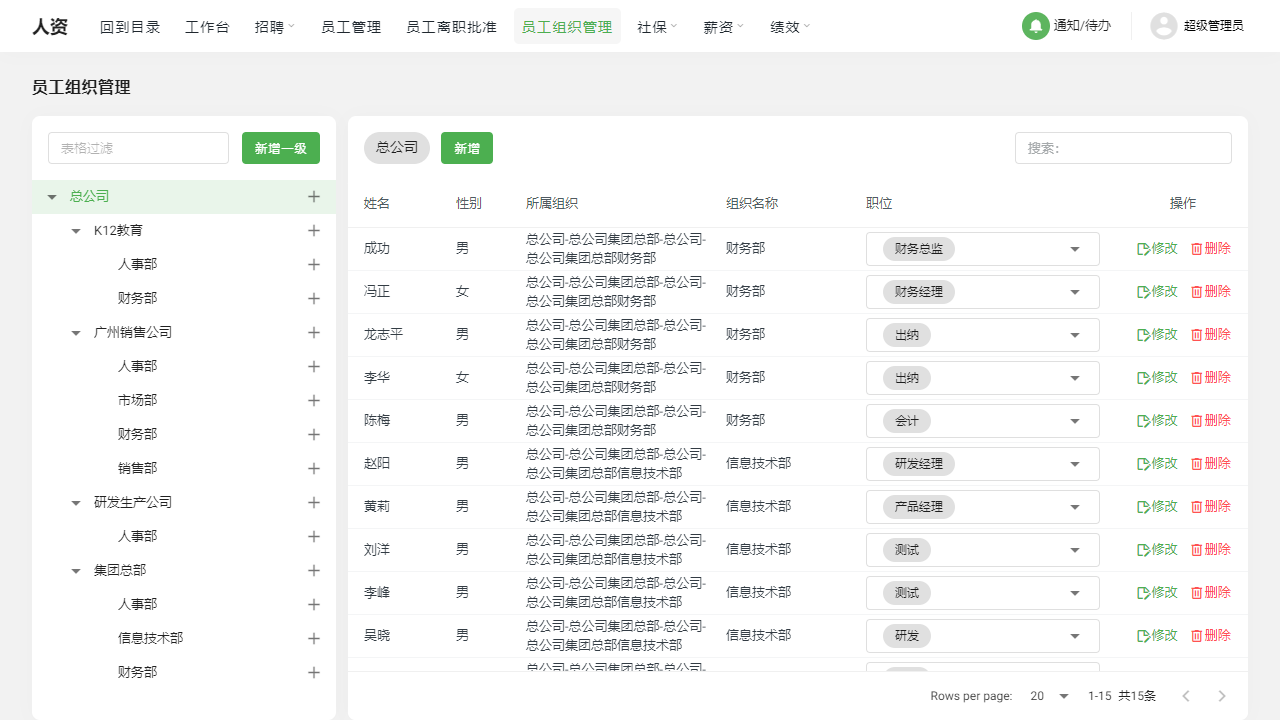
II. Function Entry
Users can quickly access the employee organization management page by clicking on the "Employee Organization Management" option at the top of the page to start building and managing the enterprise's organizational structure.
III. Function Details
- Add Organization: Users can add organizations in the organizational tree according to the actual structure of the enterprise, and the newly added organizations will be automatically arranged in the organizational tree based on hierarchical relationships.
- Employee Details: After selecting a specific employee in the organizational tree, users can view and edit the detailed information of that employee, including basic information, salary and social security status, as well as material attachments.
- Add Employee: Users can add corresponding employees to the selected organization, ensuring the accurate association between employees and organizations.
- Modify: If an employee needs to change their affiliated organization, users can reassign the organization to the employee through the modification function. This operation is very useful for adapting to internal personnel transfers and organizational structure adjustments.
- Delete: When users need to delete an employee under a certain organization, they can use the delete function. The deletion operation will completely remove the association between the employee and their affiliated organization.
IV. Precautions
- When adding a new organization, please ensure that it is added according to the actual structure of the enterprise to maintain the clarity and accuracy of the organizational tree.
- When modifying employee information, be sure to verify the correctness of the modification content to avoid information errors caused by incorrect operations.
- When performing deletion operations, please confirm carefully to avoid mistakenly deleting important employee information.
- It is recommended to regularly review and update the organizational structure and employee information to ensure the timeliness and accuracy of the data.
V. Frequently Asked Questions and Answers
Q: How can I adjust the hierarchical relationships of the organization?
A: Currently, the system does not support direct adjustments to the hierarchical relationships of the organization. If adjustments are needed, you can first delete the existing organization and then recreate the organization according to the new hierarchical relationships.
Q: After deleting an employee, can their related information be restored?
A: Once an employee is deleted, their related information cannot be directly restored. It is recommended to back up data before deletion or to operate cautiously during deletion.
Q: How can I view all employees under a certain organization?
A: Select the corresponding organization in the organizational tree, and the system will display a list of all employees under that organization. Users can view and edit detailed information about employees in this list.
Q: Can employees be added in bulk?
A: Currently, the system does not support bulk employee addition. Users need to add employees one by one and ensure the accuracy of employee information. We will consider optimizing this function in the future to improve the efficiency of adding employees.