
Course List
12122I. Function Overview
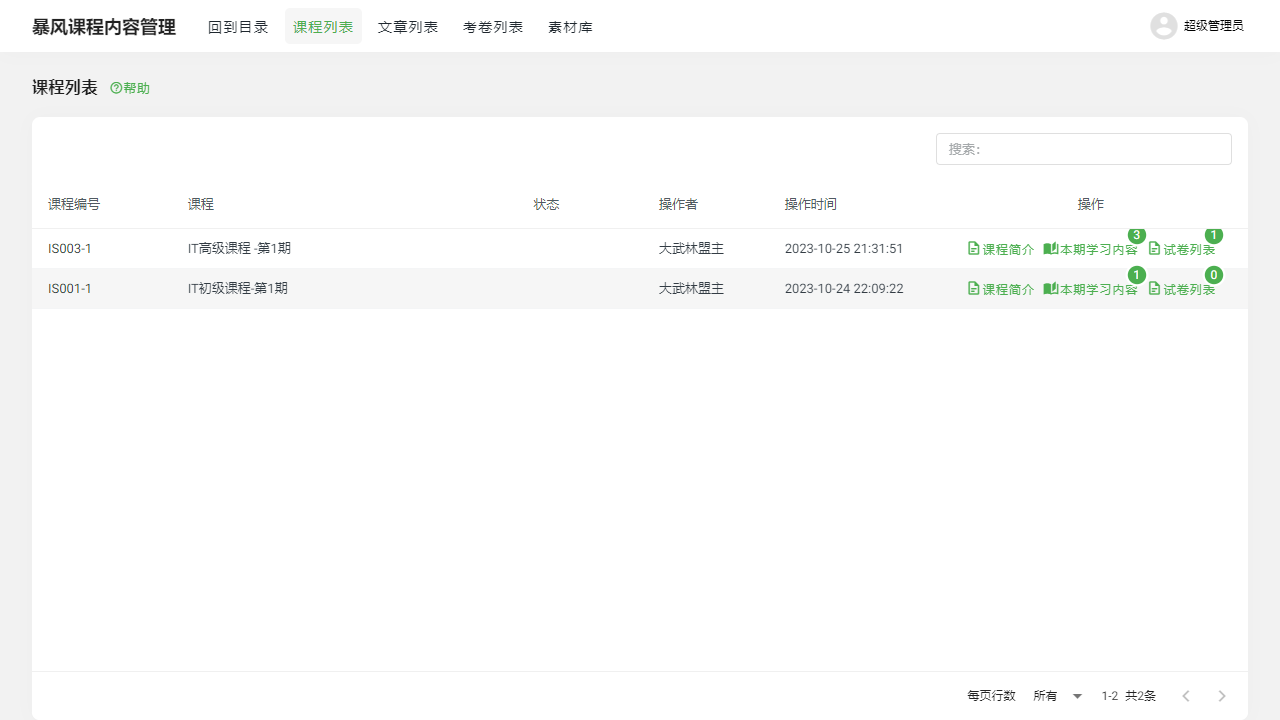
The course list feature provides comprehensive management of course content, related articles, and exam papers. Through this feature, users can conveniently view and manage the introduction, learning content, and associated exam papers for each course.
II. Function Entry
Users can directly enter the course list page by clicking the 【Course List】 tab at the top of the page, which displays an overview of all courses on the platform.
III. Function Details
1. Course List
Course Introduction: Each course will have a brief introduction to help users quickly understand the main content and objectives of the course.
Content to be Learned This Term: This section will detail all chapters and topics that need to be studied during this term, helping students and teachers clarify teaching focuses.
Number of Exam Papers: Displays the total number of exam papers associated with this course, making it easier for students and teachers to understand the assessment requirements.
2. Article Content
Users can view and edit articles related to the course. These articles may include theoretical knowledge, practical guidance, or case analyses, providing students with rich learning materials.
3. Exam Paper List
Displays all exam papers related to the current course. Students can view upcoming exams or quizzes through this list, while teachers can manage these exam papers, including adding new papers, modifying existing ones, or deleting those that are no longer needed.
IV. Notes
- Ensure that the course introduction accurately reflects the core content of the course so that students and teachers can quickly understand the key points.
- Regularly update the learning content and related articles to maintain the timeliness and accuracy of the course.
- When adding or modifying exam papers, carefully check the content and grading criteria to ensure the fairness and effectiveness of the assessment.
V. Frequently Asked Questions
Q1: How can I view the specific content of a course?
A1: On the course list page, click on the corresponding course name or introduction, which usually redirects to the detailed content page of the course, including learning content and related articles.
Q2: Can I edit the course content?
A2: This depends on your user permissions. If you are the teacher or administrator of the course, you typically have the right to edit the course content. Otherwise, you may only be able to view the content without editing.
Q3: How do I add a new exam paper?
A3: If you have the appropriate permissions, you can find the "Add Exam Paper" or similar option in the exam paper list section of the course page. Click it, and follow the prompts to fill in the details of the exam paper, such as title, description, questions, and answers, then save it.
Q4: Can exam papers be modified or deleted?
A4: Yes, if you have the appropriate permissions, you can modify the content of existing exam papers or delete those that are no longer needed. Please proceed with caution to ensure that ongoing assessments or student grade records are not affected.