
Article List
12122I. Function Overview
The article list feature provides comprehensive management of articles related to courses, allowing users to add, edit, delete, and preview articles. Additionally, users can filter the list based on article title, category, and publication status for more efficient searching and management of articles.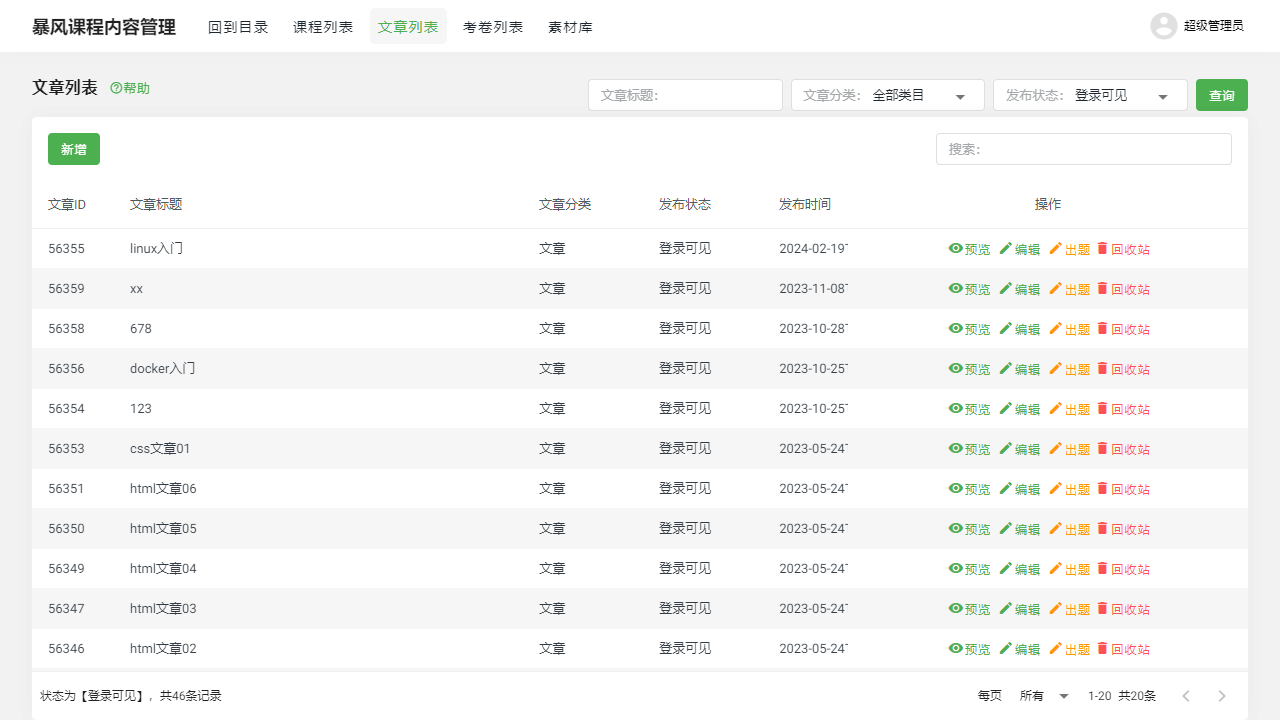
II. Function Entry
Users can directly enter the article list page by clicking the [Article List] tab at the top of the page, where all created articles are displayed.
III. Function Details
1. Article List
Add: Users can click the "Add" button to create a new article. During the creation process, basic information such as title, content, category, etc., must be filled out.
Preview: In the article list, after selecting a specific article, users can click the "Preview" button to view the detailed content of the article to check if the format and layout are correct.
Edit: If modifications to the content or settings of an existing article are needed, users can select the corresponding article and click the "Edit" button. In edit mode, users can change any information of the article.
Recycle Bin: Deleted articles will be moved to the recycle bin instead of being permanently deleted. This way, if a user accidentally deletes an article, they can recover it from the recycle bin.
Filtering Function: To help users quickly find specific articles, the article list provides filtering options based on article title, category, and publication status.
2. Article Editing Page
On the article editing page, users can set the basic information of the article, such as title, content, category, publication status, etc. Additionally, users can adjust the format and layout of the article to ensure its readability and professionalism.
IV. Notes
- When performing article management operations, please ensure that you fully understand the content and settings of the article to avoid data loss or confusion due to misoperations.
- When adding, editing, or deleting articles, be sure to verify the accuracy of the information to ensure the correctness and completeness of the article.
- Regularly review and update articles to maintain their timeliness and accuracy.
V. Frequently Asked Questions and Answers
Q1: How can I recover a deleted article?
A1: Deleted articles will be moved to the recycle bin. In the recycle bin, find the article you wish to recover and click the "Restore" button to bring it back to the article list.
Q2: Can I change a published article?
A2: Yes, but please proceed with caution. If the article has already been published and viewed by readers, direct modifications may affect the reading experience. Therefore, it is best to notify readers or choose an appropriate time to update before modifying a published article.
Q3: How can I categorize articles?
A3: When creating or editing an article, you can select or input the article's category. Categorization can help you better organize and find related articles. You can choose an appropriate category based on the article's theme, content, or purpose.