
Member Management
12122I. Function Overview
The member management feature of the Jianghu Online Teaching System aims to provide administrators with a comprehensive and convenient tool for managing teacher and student accounts registered on the platform. Through this feature, administrators can easily add, edit, or delete user accounts, ensuring the accuracy and timeliness of platform user information.
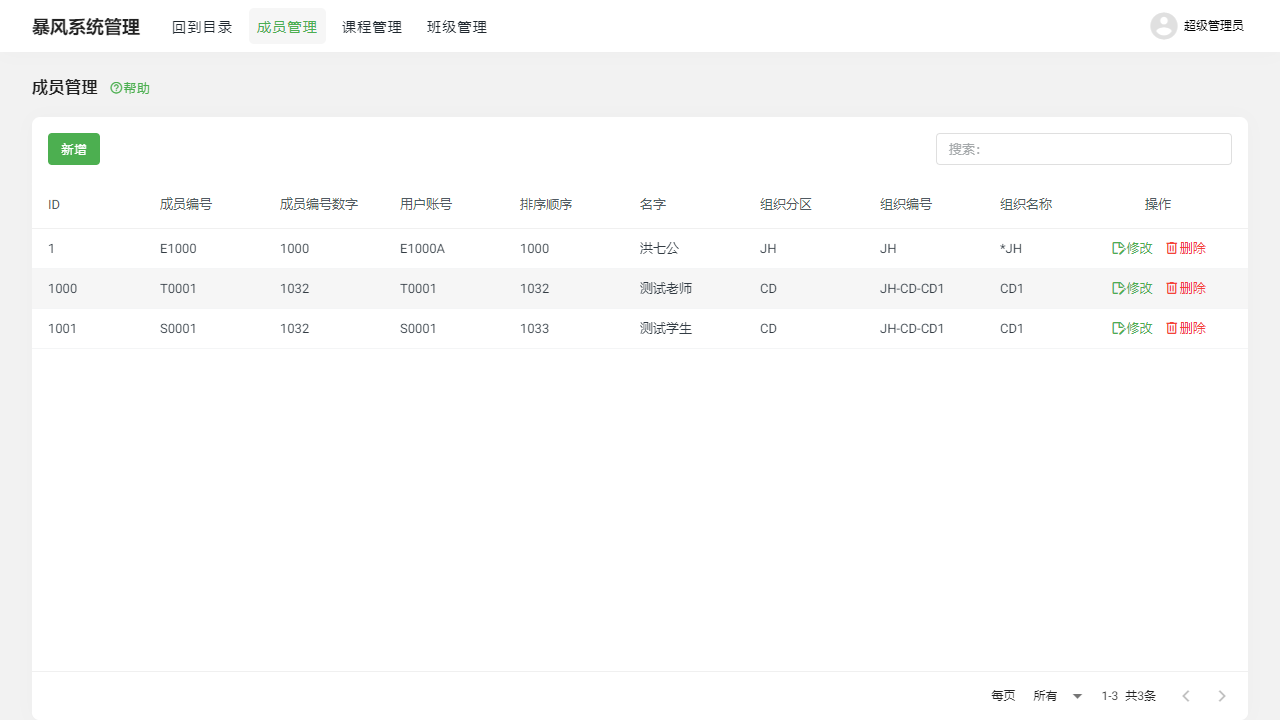
II. Accessing the Feature
To quickly access the member management feature, users only need to click on the [Member Management] tab at the top of the page, and the system will directly navigate to the member management page, displaying a clear user management interface.
III. Detailed Functionality
1. Add Member
Administrators can use the add member feature to quickly add new teacher or student accounts to the platform. During the addition process, basic user information such as name, username, and password must be filled out, and the appropriate role (teacher or student) must be assigned to the user. Additionally, the system supports bulk import of user information, greatly improving management efficiency.
2. Modify Member
If user information changes or needs to be updated, administrators can utilize the modify member feature to edit existing accounts. This includes modifying personal information, role permissions, etc. Once modifications are completed, the system will update user data in real-time, ensuring the timeliness and accuracy of the information.
3. Delete Member
For users who no longer need to use the platform, administrators can remove their accounts from the system using the delete member feature. Before deletion, the system will perform a secondary confirmation to prevent accidental operations. Deleted users will no longer be able to log into the platform, and their related data will be permanently cleared.
IV. Precautions
- When performing member management operations, please ensure that you fully understand and comply with relevant laws and regulations to protect user privacy.
- When adding, modifying, or deleting members, be sure to verify the accuracy of the information to avoid data errors or loss due to accidental operations.
- Regularly review and update member information to ensure the authenticity and validity of platform user data.
V. Frequently Asked Questions and Answers
Q1: How can I quickly find a specific user and manage them?
A1: The member management page provides a search function, allowing administrators to quickly locate specific users by entering keywords such as username or name, and perform the corresponding management operations.
Q2: Can deleted user accounts be restored?
A2: Once a user account is deleted, its related data will also be permanently cleared and cannot be directly restored. Therefore, please ensure to confirm this operation before deleting an account.
Q3: How can I assign different role permissions to users?
A3: When adding or modifying members, administrators can select the user's role type (teacher or student). Different roles will have different platform permissions and access ranges. Administrators should assign the appropriate roles to users based on actual needs.