
Operations Management
12119I. Function Overview
The operations configuration feature is a powerful management tool that allows operators to customize the display content of the user-end homepage and set global variables. Through this feature, operators can effectively control and adjust the platform's appearance, content, and user experience, thereby better meeting user needs and enhancing the platform's brand image.
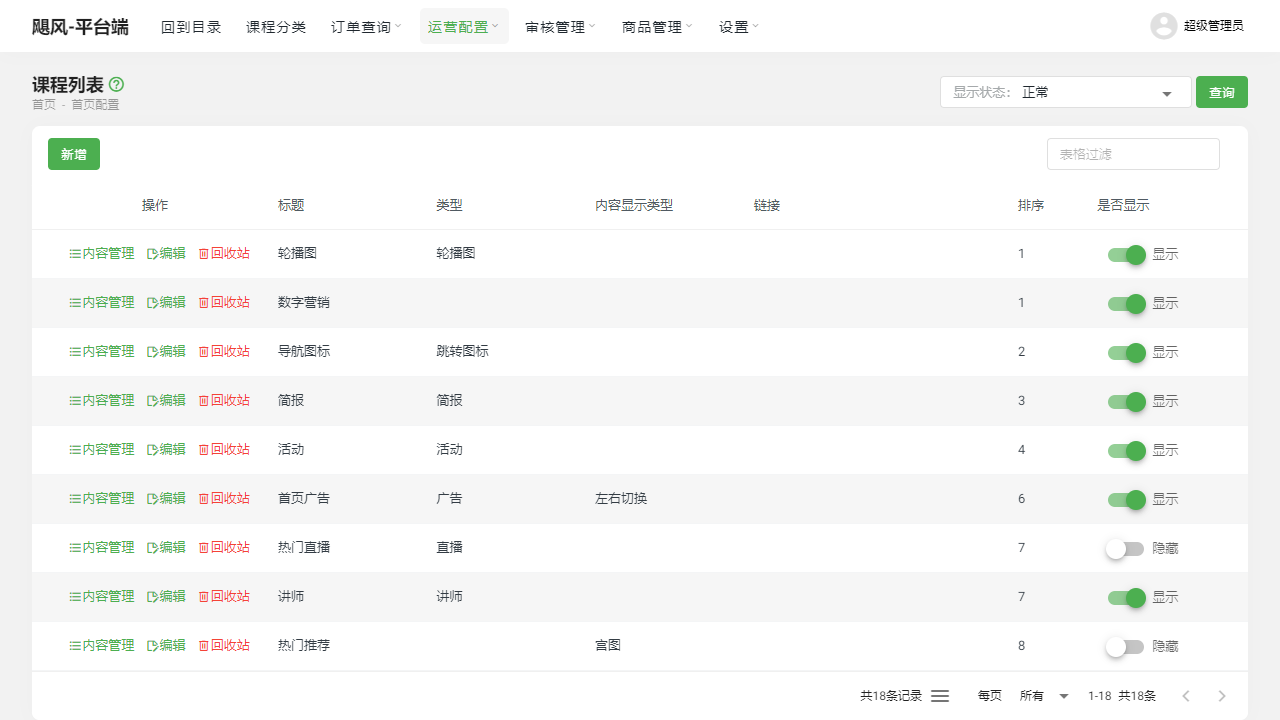
II. Function Entry
Operators can easily access the relevant pages for operations configuration by clicking the [Operations Configuration] menu at the top of the page to start various configuration tasks.
III. Function Details
Homepage Configuration:
- Add Content: Operators can add new content modules to the homepage, such as carousel images, product recommendations, news updates, etc., to enrich the display content of the homepage.
- Modify Content: For existing content modules, operators can edit and update them at any time to ensure the timeliness and accuracy of the homepage content.
- Delete Content: Unneeded content modules can be removed from the homepage to maintain a clean and orderly layout.
- Content Management: Operators can control the display order, position, and visibility status of each module on the homepage to achieve the best page layout and user experience.
Global Variable Configuration:
- Add Global Variables: As needed, operators can add new global variables, such as website title, keywords, description, etc., to facilitate SEO optimization and enhance the website's searchability.
- Modify Global Variables: The values of global variables can be modified at any time to meet the actual needs during platform operations. For example, changing the user-end logo to fit different branding strategies or updating the customer service phone number to ensure users can contact the customer service team promptly.
- Delete Global Variables: For global variables that are no longer needed, operators can delete them to maintain simplicity and efficiency in configuration.
IV. Precautions
- When performing operations configuration, please ensure a thorough understanding of the platform's functions and user needs to avoid unnecessary misoperations.
- When modifying global variables or homepage configurations, it is recommended to back up or record the original settings first, so that they can be quickly restored to their original state if needed.
- Regularly check and update configurations to ensure the platform's timeliness and user experience.
V. Frequently Asked Questions and Answers
Q: How can I optimize the user experience on the homepage?
- A: The key to optimizing the user experience on the homepage lies in providing valuable content, clear navigation, and a simple page layout. Through the operations configuration feature, you can adjust the order of homepage modules, hide unnecessary content, and add information that interests users, thereby enhancing the user experience.
Q: What is the importance of global variable configuration for platform operations?
- A: Global variable configuration is one of the fundamental settings for platform operations. By properly configuring global variables, such as website title and keywords, the platform's search ranking and brand exposure can be improved, thereby attracting more potential users to visit the platform. Additionally, global variable configuration is related to the overall image of the platform and user experience, making its importance self-evident.
Q: How can I ensure the security of operations configuration?
- A: To ensure the security of operations configuration, it is recommended to take the following measures: first, implement permission control on the operations configuration page, allowing only users with specific permissions to access and modify it; second, regularly back up configurations and conduct recovery tests to prevent data loss or configuration errors; finally, maintain security monitoring and logging for the platform to promptly identify and respond to potential security risks.