
MySQL Stored Procedures
12002Introduction to This Lesson
In previous lessons, we learned the basic operations of SQL and were able to handle simple data using these operations. In this lesson, we will introduce a method for handling complex SQL statements: stored procedures. By learning the concepts of MySQL stored procedures, the basic syntax for creating and calling them, and their application scenarios, we will understand the advantages and limitations of stored procedures, preparing us for the upcoming study of data structure design.
1. Understanding MySQL Stored Procedures
What is a Stored Procedure
In the process of data handling, it is sometimes necessary to execute a series of complex operations, which may require writing a large number of SQL statements to complete. To simplify this process, we can store these complex SQL statements in the database in advance and assign a name to them; this is what a stored procedure is.
Stored procedures can be used to perform specific database operations or handle complex business logic, simplifying application development, reducing data transfer between the database and application server, and improving data processing efficiency.
As a relational database management system, MySQL supports the creation, storage, and calling of stored procedures. Similarly, a MySQL stored procedure is a set of complex SQL statements that are stored in the database as a function for later invocation. Developers can use it to perform various data operations, such as querying, updating, deleting, etc., achieving more efficient data processing and management.
Creating and Calling MySQL Stored Procedures
Here is the basic syntax for creating a MySQL stored procedure:
DELIMITER //
CREATE PROCEDURE simple_procedure()
BEGIN
     -- Write SQL statements here
END //
DELIMITER ;
In the above syntax, key points include:
DELIMITER: Used to change the statement terminator, which is usually a semicolon;, but needs to be changed to//when defining a stored procedure to avoid conflicts with the statement terminator within the stored procedure.CREATE PROCEDURE: Used to declare a stored procedure.procedure_name: The name of the stored procedure.BEGIN...END: The body of the stored procedure, which contains the SQL statements to be executed.DELIMITER ;: Changes the statement terminator back to a semicolon, restoring the default setting.
Next, we will deepen our understanding of this syntax by creating a simple stored procedure:
- In Navicat, select the database "mystudent", open a new query, then copy and paste the following code and run it:
DELIMITER //

CREATE DEFINER = CURRENT_USER PROCEDURE student_ssex()
BEGIN
    SELECT *
    FROM student
    WHERE ssex = 'Male';
END //

DELIMITER ; 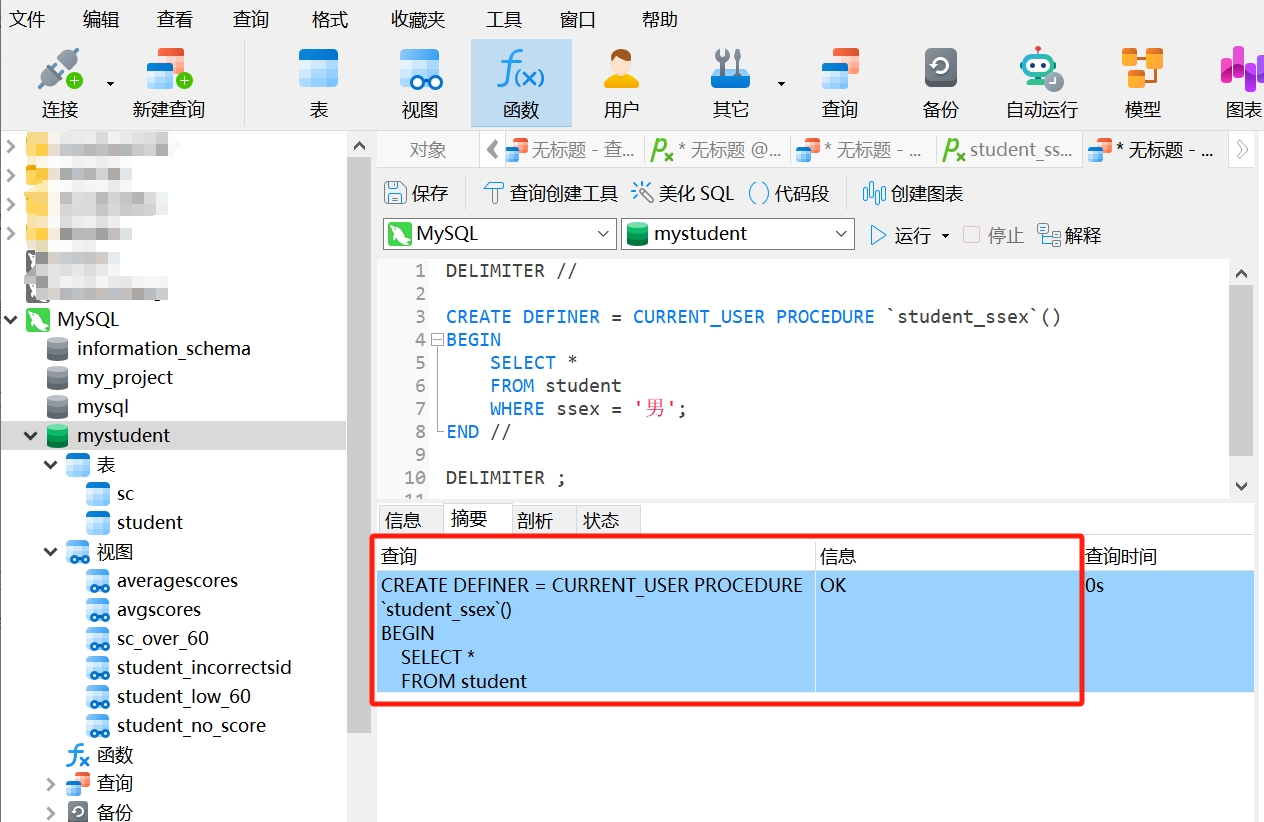
- Click "Functions", right-click and select "Refresh"
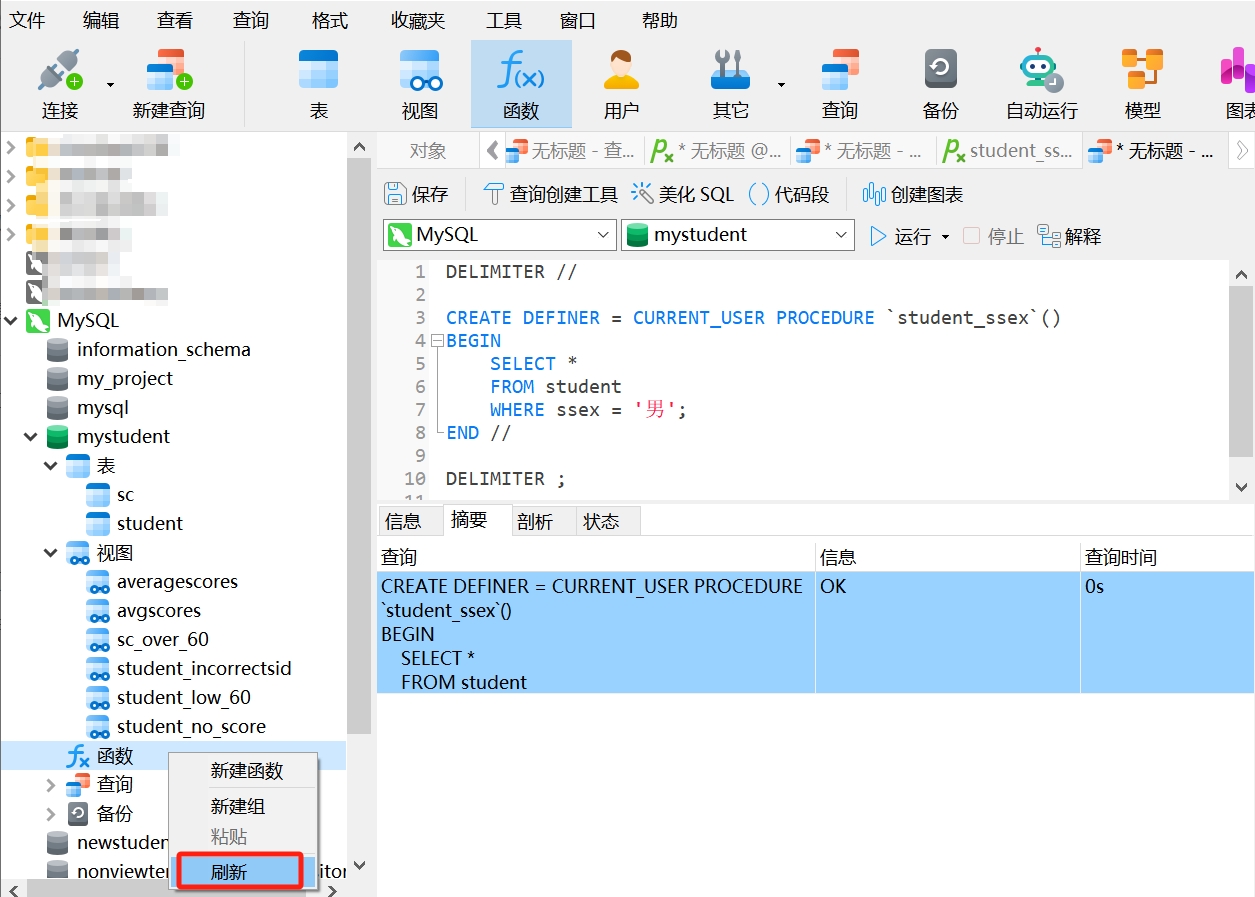
- After refreshing, you will see the just created stored procedure
student_ssex(). Click "Run" to execute the SQL operations defined in that stored procedure.
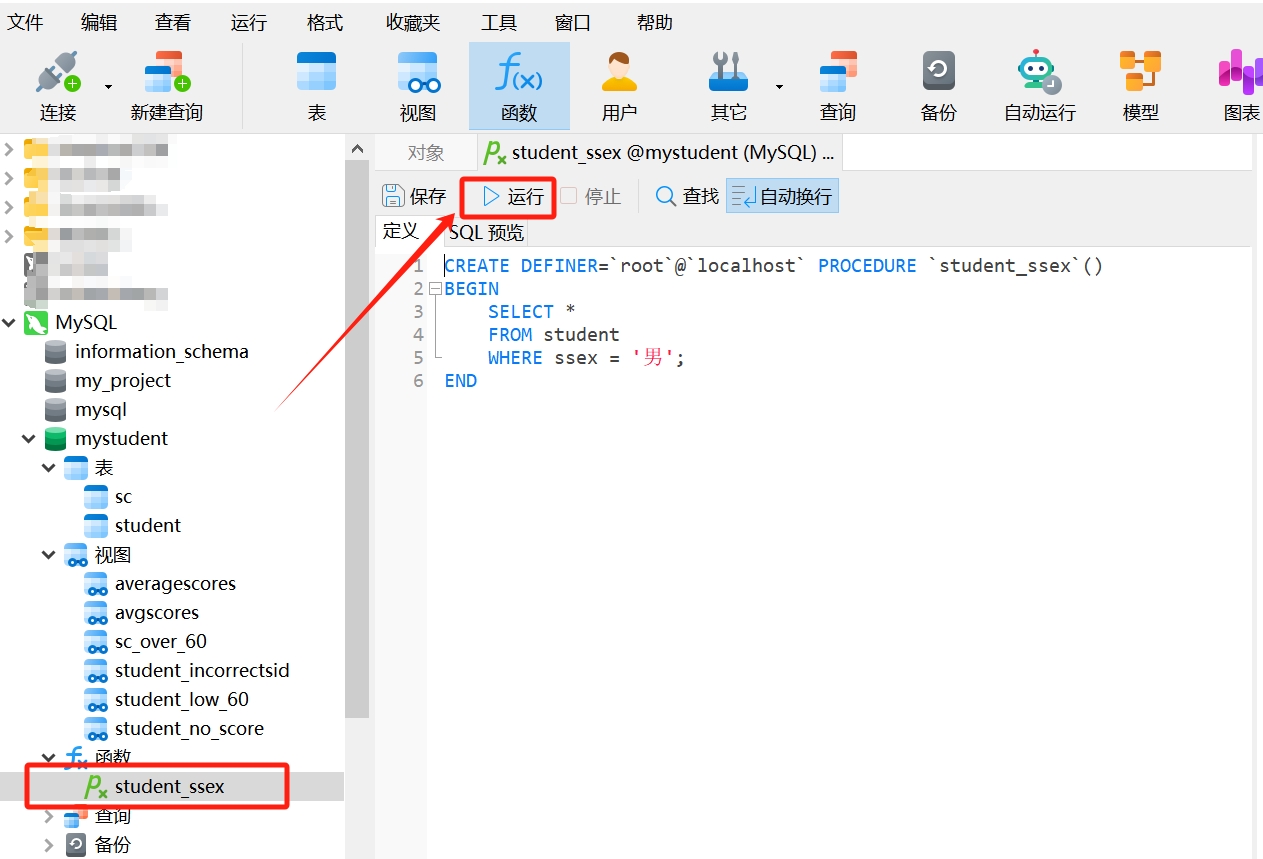
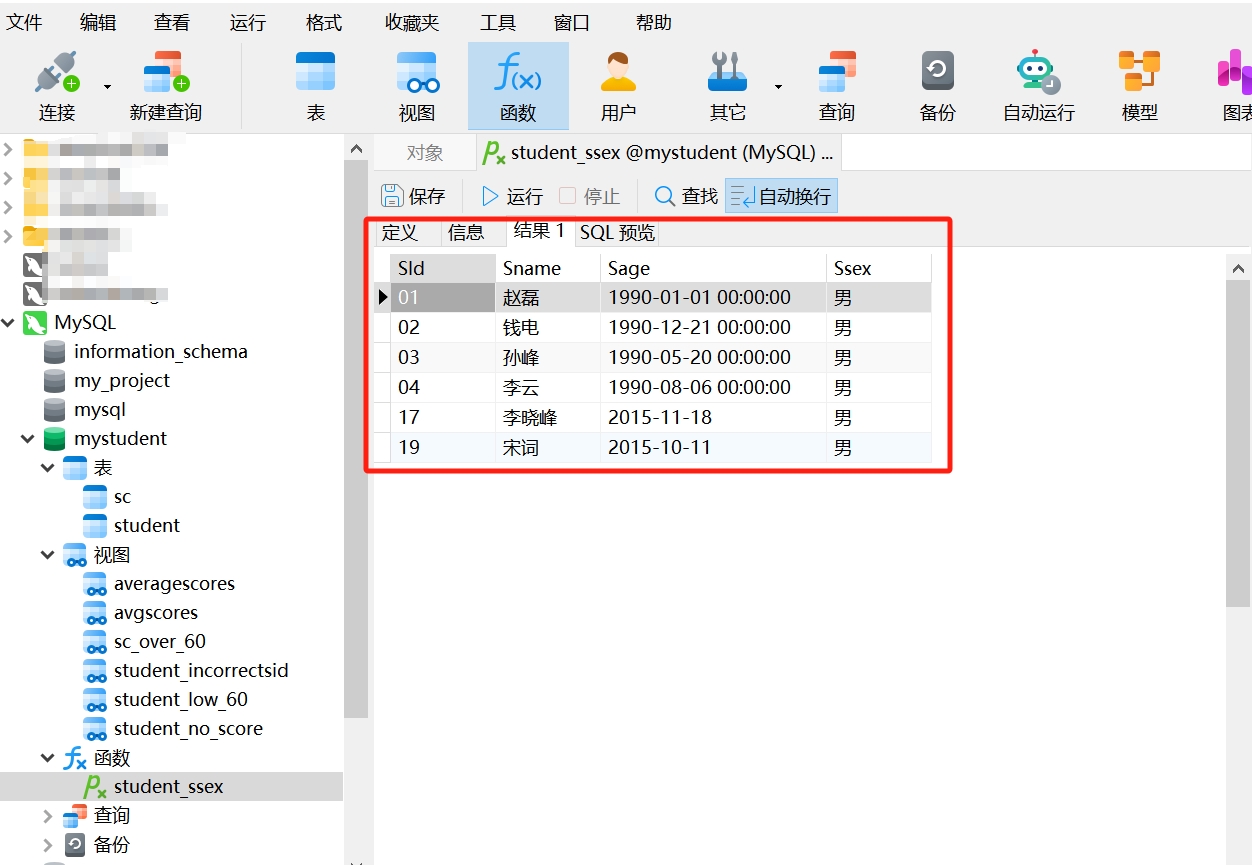
Thus, we have created a simple stored procedure. We named this stored procedure student_ssex(), which is stored in the database as a function. When this stored procedure is executed, it will run the following SQL statement to query all male students from the "student" table.
-- Executed SQL statement
    SELECT *
    FROM student
    WHERE ssex = 'Male';
Once the MySQL stored procedure is created, it can be called using the following method:
CALL simple_procedure(); Let's try calling the stored procedure student_ssex() that we just created:
In Navicat, select the database "mystudent", open a new query, then copy and paste the following code and run it to directly see the execution result as follows:
CALL student_ssex(); 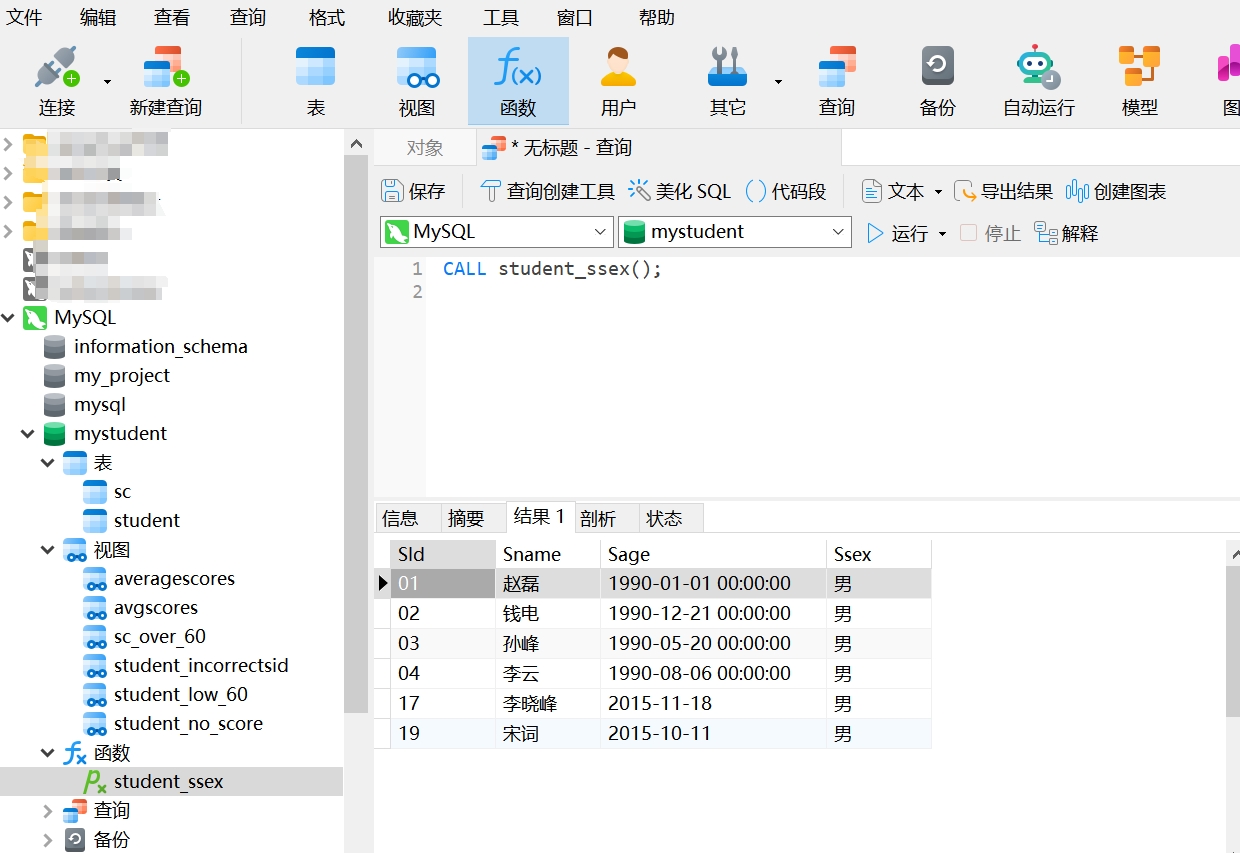
This simple example can help you better understand the concept of MySQL stored procedures, as well as how to create and call them. Next, you can explore the usage of parameters, variables, and control statements in MySQL stored procedures more deeply by reading the tutorials on Runoob.
Reference: MySQL Stored Procedures
2. Scenarios for Using MySQL Stored Procedures
Use Cases
In the previous example, MySQL stored procedures may seem somewhat similar to views. However, their functions and use cases are not the same. MySQL stored procedures are stored in the database in the form of functions and can implement complex business logic for inserting, updating, deleting data, etc., and can be called and executed in both the database and applications; whereas views are virtual tables that typically only provide query results for complex data.
MySQL stored procedures can play an important role in many scenarios, especially when handling complex data operations and business logic. Here are some practical use cases for stored procedures in database table design:
Complex Data Operations: Stored procedures can encapsulate complex data operation logic in a single unit, simplifying code and improving efficiency. For example, stored procedures can be used to calculate students' average scores or perform complex data transformation operations.
Business Logic Processing: Stored procedures can be used to implement business rules and logic, such as calculating business metrics, generating reports, executing specific business processes, etc. By using stored procedures, business logic can be centralized in the database, improving the consistency and reliability of data processing.
Reducing Network Traffic: Stored procedures can reduce the number of interactions with the database, thereby decreasing network traffic and improving system performance. Stored procedures execute on the database server, only needing to transmit the results back to the client, avoiding the need to transfer large amounts of data and execute multiple queries each time.
Advantages and Disadvantages
We can further understand that MySQL stored procedures encapsulate a set of SQL database operations for easy reuse and hiding of complex details. They have some benefits, such as the ability to pass parameters and return results, and can be used to validate data and enforce specific rules.
However, MySQL stored procedures are only applicable to specific MySQL databases, and switching databases may require rewriting. Performance optimization is limited by the characteristics of different database systems and may require personalized adjustments.
Overall, MySQL stored procedures are useful for simplifying database operations and handling complex logic, but attention must be paid to cross-database compatibility and performance tuning. Therefore, when using them, it is essential to consider specific situations, weigh the pros and cons, and improve system efficiency and maintainability.