
Database Indexes
120021. Why Use Indexes
A database index is a data structure used to improve the query speed of database tables. The main reasons for using indexes include:
- Fast Data Retrieval: Indexes can accelerate data retrieval operations, especially in large data tables. By using indexes, the database engine can more quickly locate and retrieve data that meets the query conditions without scanning the entire table.
- Reduced Overhead of Table Scanning: Without indexes, executing a query may require scanning the entire table to find matching records. With indexes, only the index data structure needs to be scanned, significantly reducing the overhead of query operations.
- Enhanced Uniqueness Constraints: Indexes can be used to enforce uniqueness constraints, ensuring that the values in a particular column or group of columns are unique. This is very useful for maintaining data consistency and preventing the insertion of duplicate data.
- Accelerated Sorting and Grouping Operations: When performing sorting or grouping operations, indexes can significantly improve performance as they provide a sorted view of the data without needing to sort the entire table again.
- Optimized Join Operations: In join operations, indexes can speed up the execution of joins, especially when there are indexes on the join conditions.
- Accelerated Calculation of Aggregate Functions: For queries using aggregate functions (such as SUM, AVG, COUNT, etc.), indexes can improve calculation performance by providing a quick access path to summarized data.
Overall, indexes are an important means of database optimization that can significantly enhance query performance. However, it is important to note that excessive use of indexes may negatively impact the performance of write operations such as inserts, updates, and deletes. Therefore, when designing indexes, it is necessary to balance specific query requirements and data access patterns.
2. Types of Indexes and Creation
- Regular Index
A regular index is the most basic type of index, which does not have uniqueness constraints and allows duplicate index key values in the table. Creating a regular index can improve query speed but does not restrict the uniqueness of fields.
SQL Example: Adding a Regular Index using the CREATE INDEX statement
CREATE INDEX index_name ON table_name (column1, column2, ...);Deleting a Regular Index using the DROP INDEX statement
DROP INDEX index_name ON table_name;- Unique Index
A unique index is similar to a regular index, but it requires the values in the indexed columns to be unique, disallowing duplicate index key values. Unique indexes are typically used to ensure the uniqueness of data in a particular column of the table.
SQL Example: Adding a Unique Index using the CREATE UNIQUE INDEX statement
CREATE UNIQUE INDEX index_name ON table_name (column1, column2, ...);Deleting a Unique Index using the DROP INDEX statement
DROP INDEX index_name ON table_name;- Primary Key Index
A primary key index is a special type of unique index used to uniquely identify each row in a data table. A primary key index cannot be null, and the values in each row must be unique. Typically, the primary key of a database table consists of one or more fields.
SQL Example: Adding a Primary Key using the ALTER TABLE statement
ALTER TABLE table_name
ADD PRIMARY KEY (column1, column2, ...);
Deleting a Primary Key using the ALTER TABLE statement
ALTER TABLE table_name
DROP PRIMARY KEY;- Full-text Index
A full-text index is used to perform full-text searches on text data, allowing for more complex text matching and search operations. It is typically used for efficient keyword searches on large text fields (such as article content).
SQL Example:
CREATE FULLTEXT INDEX idx_content ON articles (content);- Spatial Index
A spatial index is used to support queries on spatial data such as those in Geographic Information Systems (GIS). This type of index allows for specific search and analysis operations in spatial coordinates, such as distance calculations and area queries.
SQL Example:
CREATE SPATIAL INDEX idx_location ON spatial_data (location);- Viewing Index Information
SQL Example: Viewing the index information of a table using the SHOW INDEX statement
SHOW INDEX FROM table_name;- Navicat Index Creation Example
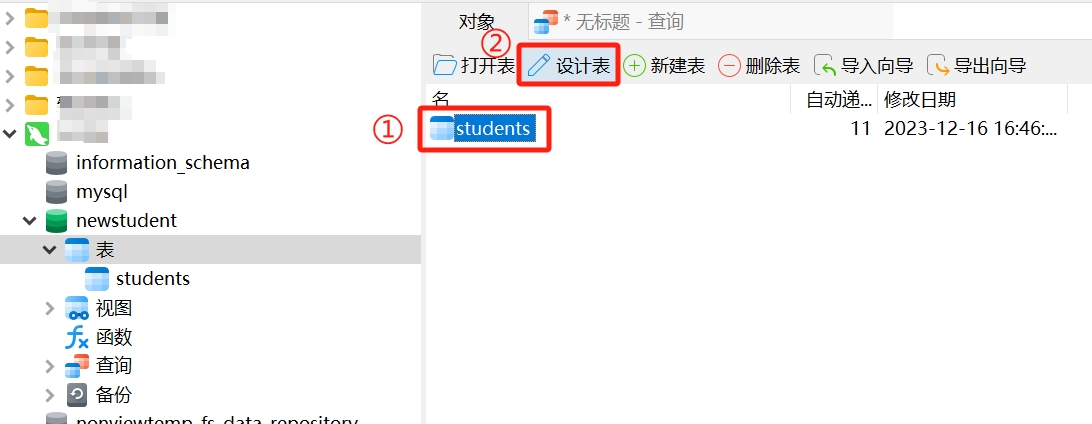
- Open Navicat and connect to the database. Locate the table where you want to create an index, select the table, and click "Design Table."
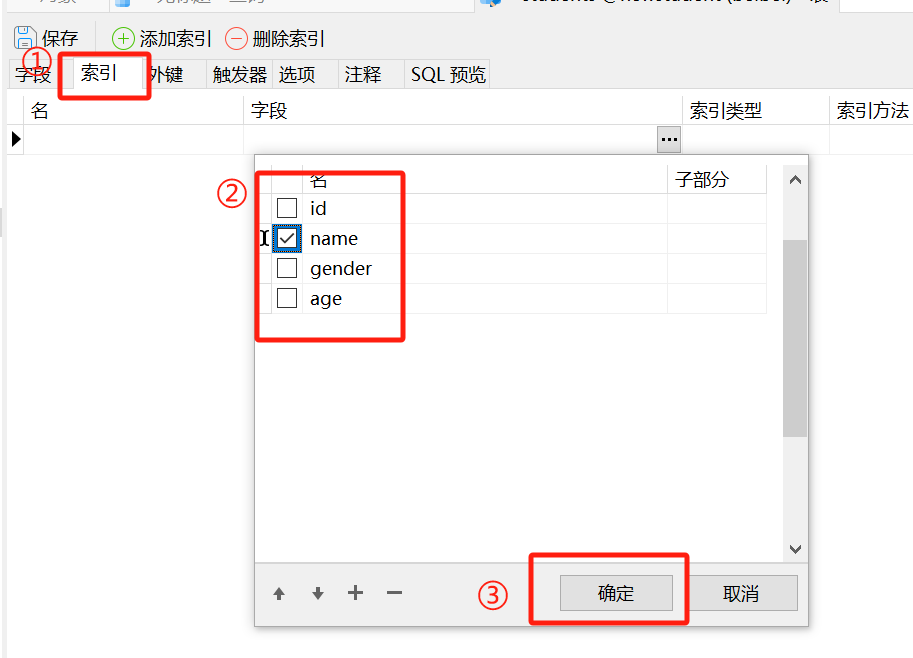
- Select "Indexes" and choose the fields for which you want to create indexes.
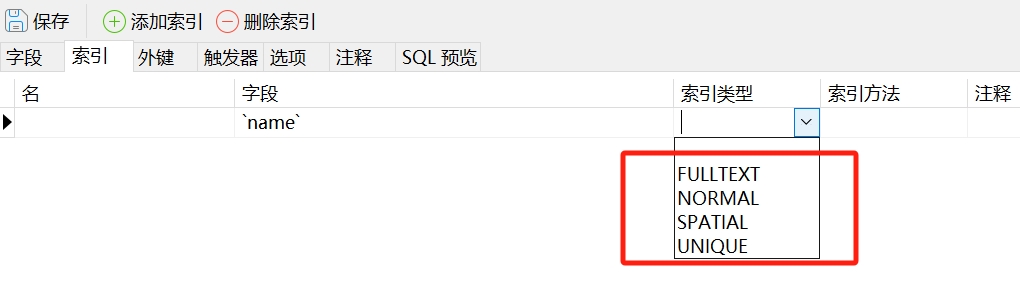
- On the right side of the field, select the index type (Regular, Unique, Primary, etc.).
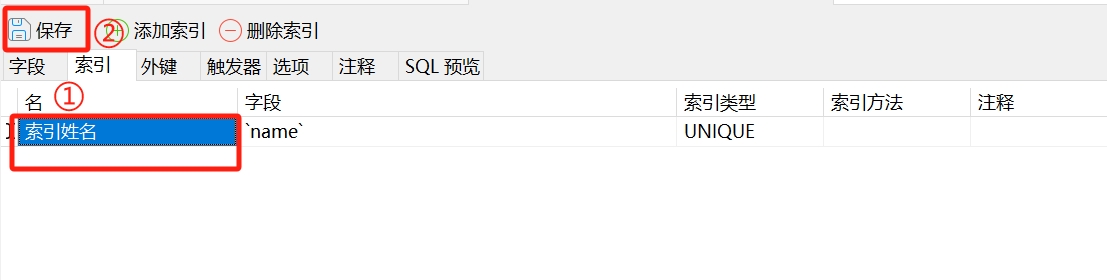
- Set the index name, save the table structure design, and the index creation will be complete.
3. Advantages and Disadvantages of Indexes
Advantages of Indexes:
- Improved Retrieval Speed: Indexes can significantly enhance the retrieval speed of databases, especially in large datasets.
- Accelerated Sorting and Aggregation Operations: For operations such as sorting and aggregation, indexes can effectively speed up these processes and improve query performance.
- Enhanced Uniqueness Constraints: Unique indexes and primary key indexes help ensure the uniqueness of data in tables, preventing the insertion of duplicate data.
- Optimized Join Operations: In queries that join multiple tables, indexes can accelerate join operations and reduce the time for data matching.
Disadvantages of Indexes:
- Storage Space Consumption: Indexes require additional storage space, and as the volume of data increases, the size of the indexes will also grow.
- Reduced Write Operation Performance: When performing write operations such as inserts, updates, and deletes on a table, indexes need to be updated, which may lead to a decrease in write operation performance.
- Not Suitable for Small Tables: For small tables, the performance improvement from indexes may not be significant and could even lead to performance degradation.
- Requires Regular Maintenance: Indexes need to be maintained regularly, especially when a table undergoes a large number of write operations, as maintaining indexes may become a performance bottleneck.
- Poor Selection May Lead to Performance Issues: If not chosen carefully, creating too many or unnecessary indexes may lead to performance problems, so it is important to select index fields judiciously.
When using indexes, it is essential to consider their advantages and disadvantages based on specific business needs and database usage scenarios, and to design indexes reasonably to achieve optimal performance.