
Deep Dive into Vue.js
120021. Reactive Principles
- Introduction to Principles
The reactive principle of Vue.js refers to its ability to automatically update all views related to data when changes occur. This process is achieved through Vue.js's dependency tracking system, which is fundamentally about binding data to views and automatically updating the views when data changes.
When you pass a regular JavaScript object into a Vue instance as the data option, Vue will traverse all the properties of this object and convert them into getters/setters using Object.defineProperty.
These getters/setters are invisible to the user, but internally they allow Vue to track dependencies and notify changes when properties are accessed and modified. It is important to note that different browsers format getters/setters differently when printing data objects to the console, so it is recommended to install vue-devtools for a more user-friendly interface for inspecting data.
Each component instance corresponds to a watcher instance, which records the data properties it has "touched" as dependencies during the component's rendering process. Later, when the setter of a dependency is triggered, it notifies the watcher, causing the associated component to re-render.
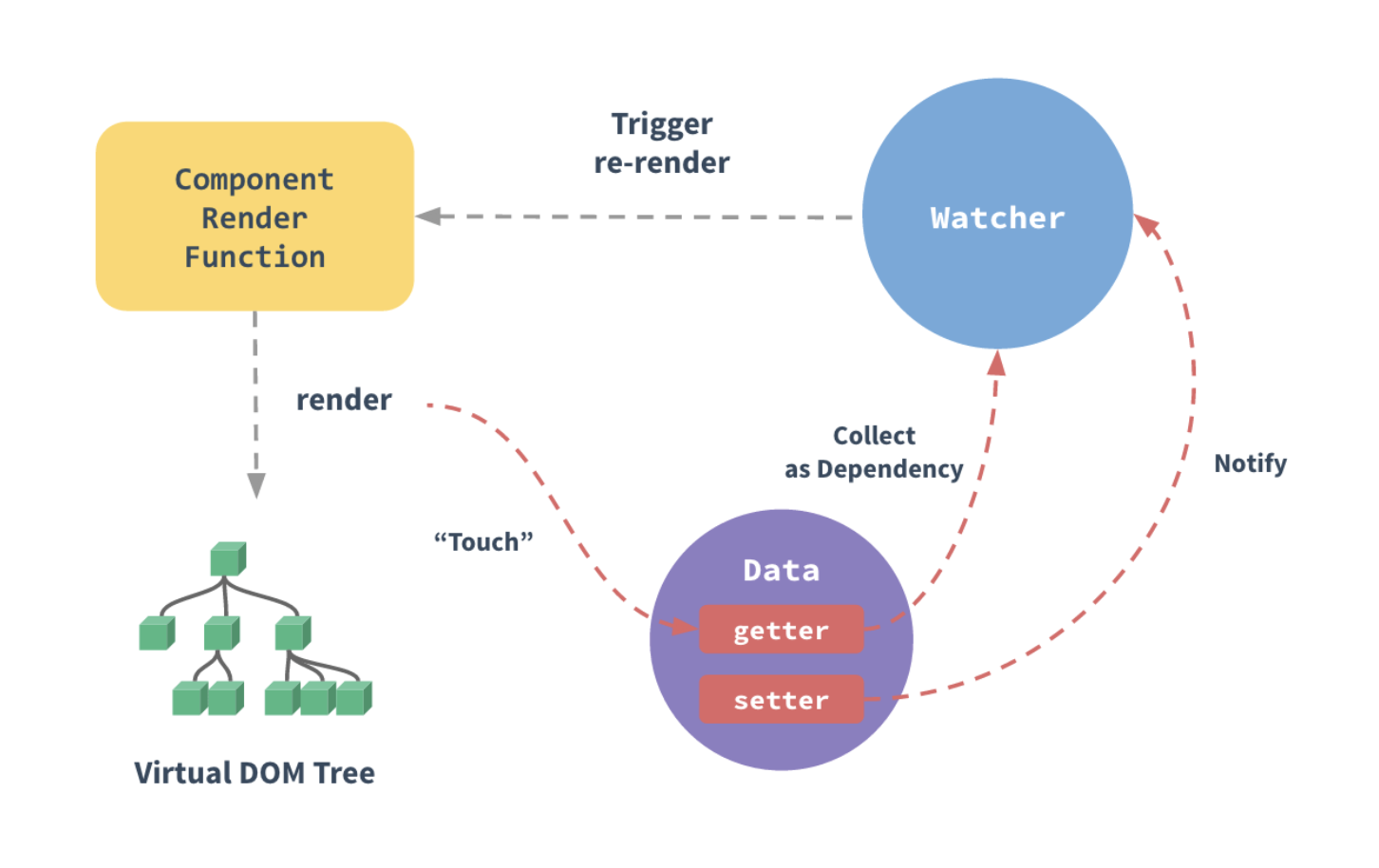
2. Considerations
Due to limitations in JavaScript, Vue cannot detect changes to arrays and objects. Nevertheless, there are ways to work around these limitations and ensure their reactivity.
- Detection of Arrays and Objects
- Replacing Array Elements:
Vue can detect changes when array elements are replaced using the following method, triggering a view update:
// Correct way
vm.items[indexOfItem] = newValue;

// Incorrect way, Vue cannot detect this
vm.items[indexOfItem + 1] = newValue;
If you need to replace an array element, ensure you do so directly at the index position.
- Modifying Array Length:
Vue can also detect changes to the length of an array, such as when modifying the length using methods like push, pop, shift, unshift, etc.
// Correct way
vm.items.push(newItem);

// Correct way
vm.items.length = newLength;

// Incorrect way, Vue cannot detect this
vm.items[indexOfItem + 1] = undefined;
If you need to modify the length of an array, it is recommended to use methods that Vue can detect.
- Directly Setting Properties:
Vue can detect changes when object properties are directly set, triggering a view update.
// Correct way
vm.user.name = 'John';

// Correct way
Vue.set(vm.user, 'age', 30);

// Incorrect way, Vue cannot detect this
vm.user.address = '123 Main St';
If you need to add or modify object properties, it is recommended to use the Vue.set method provided by Vue.
- Modifying Object Properties:
Vue can also detect changes when object properties are directly modified, triggering a view update.
// Correct way
vm.user.name = 'John';

// Incorrect way, Vue cannot detect this
vm.user.name.toUpperCase();
If you need to modify object properties, ensure you use the method of directly modifying the properties.
Overall, when manipulating arrays or objects, please ensure you use methods that Vue can detect to ensure the views correctly respond to data changes.
3. Detecting Objects
- Adding or Removing Properties
Vue cannot detect the addition or removal of properties. Since Vue executes getter/setter transformations on properties when initializing the instance, properties must exist on the data object for Vue to convert them into reactive properties. For example:
var vm = new Vue({
  data:{
    a:1
  }
})

// `vm.a` is reactive

vm.b = 2
// `vm.b` is non-reactive - Dynamically Adding Reactive Properties at the Root Level
For already created instances, Vue does not allow dynamically adding reactive properties at the root level. However, you can use the Vue.set(object, propertyName, value) method to add reactive properties to nested objects. For example:
Vue.set(vm.someObject, 'b', 2) You can also use the vm.$set instance method, which is an alias for the global Vue.set method:
this.$set(this.someObject, 'b', 2) - Assigning Multiple New Properties to Existing Objects
Sometimes you may need to assign multiple new properties to an existing object, such as using Object.assign() or _.extend(). However, new properties added to the object this way will not trigger updates. In this case, you should create a new object with the original object and the properties to be mixed in.
// Instead of `Object.assign(this.someObject, { a: 1, b: 2 })`
this.someObject = Object.assign({}, this.someObject, { a: 1, b: 2 })
4. Detecting Arrays
Vue cannot detect the following changes to arrays:
When you directly set an array item using an index, for example: vm.items[indexOfItem] = newValue
When you modify the length of an array, for example: vm.items.length = newLength
For example:
var vm = new Vue({
  data: {
    items: ['a', 'b', 'c']
  }
})
vm.items[1] = 'x' // Not reactive
vm.items.length = 2 // Not reactive - Directly Setting an Array Item Using an Index
To solve the first type of problem, either of the following methods can achieve the same effect as vm.items[indexOfItem] = newValue and will also trigger state updates within the reactive system:
// Vue.set
Vue.set(vm.items, indexOfItem, newValue)
// Array.prototype.splice
vm.items.splice(indexOfItem, 1, newValue) You can also use the vm.$set instance method, which is an alias for the global method Vue.set:
vm.$set(vm.items, indexOfItem, newValue) - Modifying Array Length
To solve the second type of problem, you can use splice:
vm.items.splice(newLength) 5. Declaring Reactive Properties
- Explanation of Not Allowing Dynamic Addition of Root-Level Reactive Properties
Since Vue does not allow dynamically adding root-level reactive properties, you must declare all root-level reactive properties before initializing the instance, even if they are just empty values:
var vm = new Vue({
  data: {
    // Declare message as an empty string
    message: ''
  },
  template: '<div>{{ message }}</div>'
})
// Then set `message`
vm.message = 'Hello!'
If you do not declare message in the data option, Vue will warn you that the render function is trying to access a non-existent property.
This limitation has technical reasons behind it; it eliminates a class of edge cases in the dependency tracking system and allows Vue instances to work better with type checking systems. However, there is also an important consideration regarding code maintainability: the data object serves as the structure (schema) of the component's state. Declaring all reactive properties in advance can make the component code easier to understand for future modifications or for other developers.
6. Virtual DOM
- Concept
The virtual DOM is a lightweight JavaScript object that corresponds to the structure of the real DOM tree. In Vue.js, when data changes, Vue.js recalculates the virtual DOM tree and compares the new virtual DOM tree with the old one to identify the parts that need to be updated, and only updates those parts. Vue.js then uses the updated virtual DOM tree to update the real DOM tree, a process known as "DOM re-rendering."
Vue tracks how to change the real DOM by establishing a virtual DOM. Pay close attention to this line of code:
return createElement('h1', this.blogTitle) What does createElement actually return? It is not an actual DOM element. A more accurate name might be createNodeDescription, as the information it contains tells Vue what kind of node needs to be rendered on the page, including descriptions of its child nodes. We refer to such node descriptions as "virtual nodes (VNode)," and we often abbreviate it as "VNode." The term "virtual DOM" refers to the entire VNode tree established by the Vue component tree.
- Advantages
- Using the virtual DOM can improve the performance of Vue.js because Vue.js does not need to re-render the entire DOM tree every time. Instead, Vue.js only updates the parts that need to be updated. This makes Vue.js particularly suitable for developing high-performance single-page applications.
- Additionally, using the virtual DOM can simplify DOM operations in Vue.js. Because Vue.js can use some advanced algorithms to optimize DOM operations when handling the virtual DOM, these algorithms are typically more efficient and reliable than manually updating the DOM.