
Connection between Frontend Pages and Backend Databases
120021. Course Introduction
In this lesson, you will learn the basic concepts of communication protocols and understand how frontend pages establish connections with backend databases through these protocols. Typically, frontend pages use axios to send data to backend data interfaces.
The Jianghu JS framework simplifies axios by using jianghuAxios to send data. We will compare the differences in data packet formats between these two sending methods through examples.
Finally, try performing CRUD (Create, Read, Update, Delete) operations on the page and observe the changes in the data within the database.
2. Key to Connecting Frontend Pages and Backend Databases: Communication Protocol
When establishing a connection between frontend pages and backend databases, communication protocols play a crucial role. A communication protocol is a set of specifications and agreements for data exchange and communication. When frontend pages and backend databases can communicate according to a unified specification, it ensures the stability and reliability of data transmission.
3. Tools for Sending Data from Frontend Pages
Frontend typically uses the axios tool to send data requests to backend database interfaces. It adheres to the specifications of communication protocols to achieve data transmission and communication between frontend pages and backend database interfaces.
The Jianghu JS framework has developed its own jianghuAxios tool based on axios, simplifying the content of the axios package and improving programming efficiency.
4. Interfaces for Backend Database Data Processing
Data interfaces serve as a bridge for data interaction between the frontend and backend, typically including four types: Create, Read, Update, and Delete. These interfaces receive request data from the frontend, analyze the needs of the frontend requests, process the data according to those needs, perform operations on the database, and finally return the processed data to the frontend.
5. Using the axios Package to Achieve Frontend-Backend Connection
When using the axios tool to initiate a request, the axios function is called with the following parameters:
method: This specifies the request method, such as GET, POST, PUT, or DELETE. GET is used to retrieve resources, POST is used to submit data, PUT is used to update resources, and DELETE is used to remove resources.url: This is the target URL address to which the request is sent, specifying where the request should go.data: This is the data to be sent, written according to the specifications required by the communication protocol.
Open the protocleDemo.html file in the jianghu-basic project using VSCode, and locate the position where the axios function is used:
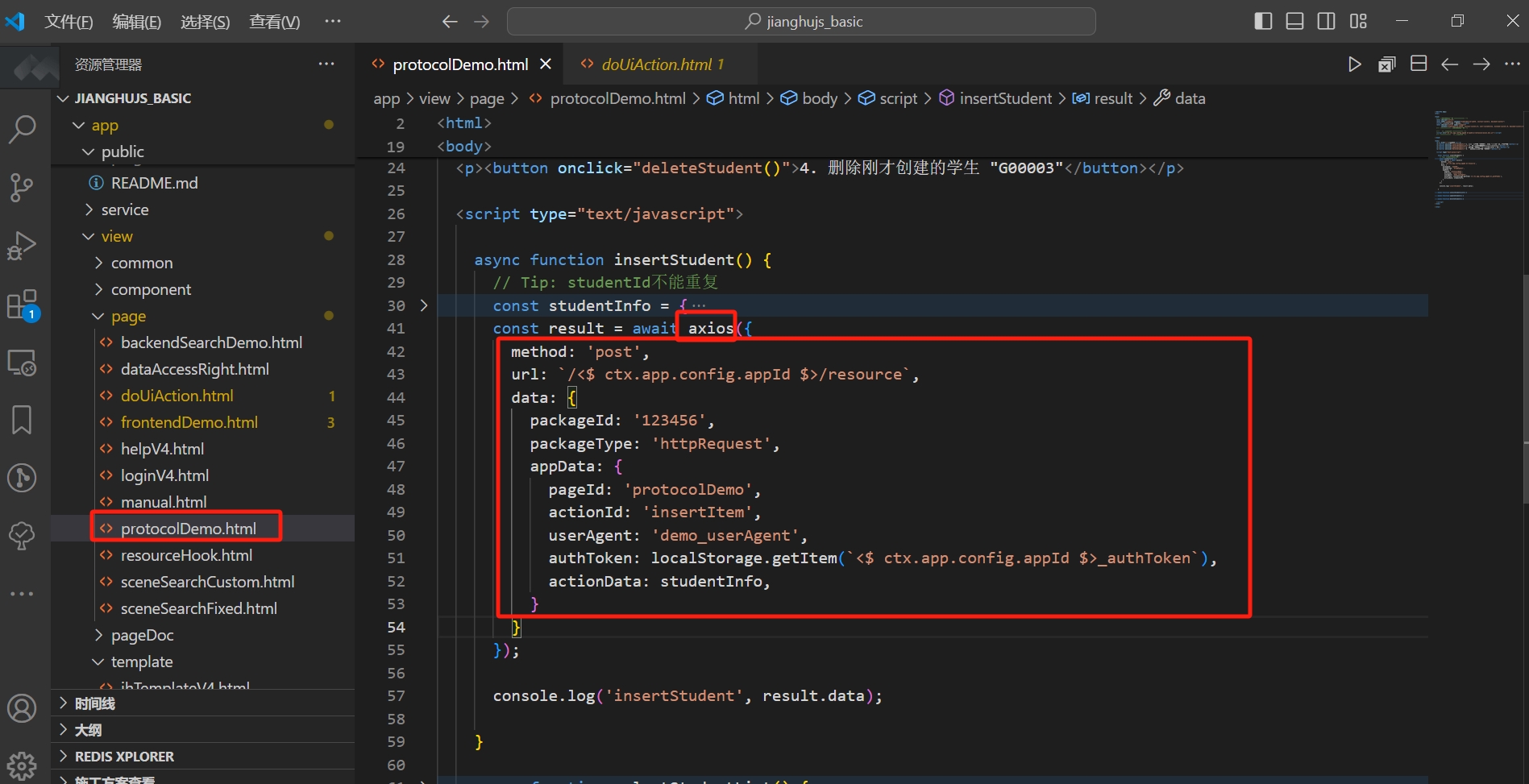
Summarize the contents of the axios package from the above image:
- Request method
method:post, which is a request for submitting data. - Request address
url:/<$ ctx.app.config.appId $>/resource, where<$ ctx.app.config.appId $>is a variable, and the request address here is/jianghujs_basic/resource. - Data to be sent
data: This is an object that includesappData, as well aspackageIdandpackageType. These are all written according to the agreements of the communication protocol.
If you want to learn more about axios, please refer to the documentation: axios official website axios official website, Jianghu JS framework user manual.
6. Simplifying the Connection Process with the jianghuAxios Package
The Jianghu JS framework provides a more convenient tool than axios, called jianghuAxios. When using jianghuAxios to initiate a request, the jianghuAxios function is called with only the data parameter.
Open the frontendDemo.html file in the jianghu-basic project using VSCode, and locate the position where the jianghuAxios function is used:
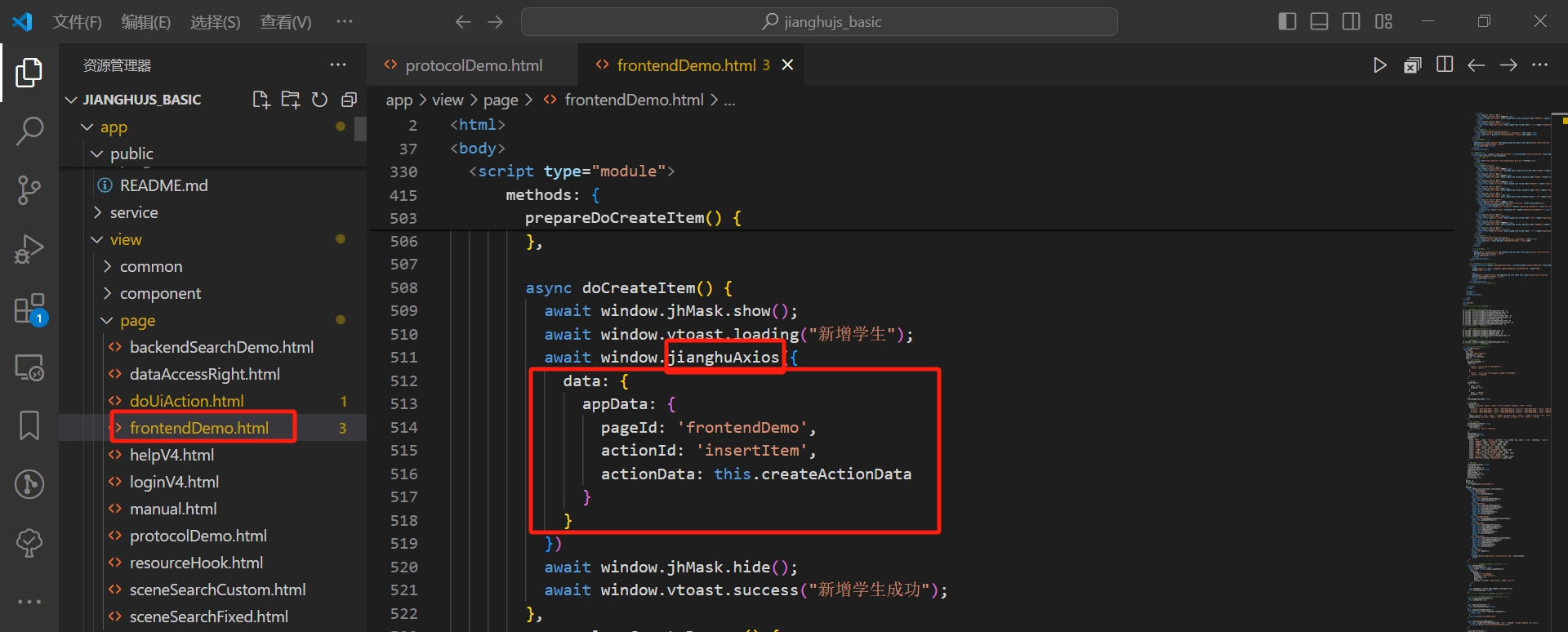
Summarize the contents of the jianghuAxios package from the above image:
The parameter is only data, which is an object that contains only appData, and it has significantly fewer contents than the data in the axios package, simplifying the amount of code.
Parameters in appData:
- Page ID
pageId, filled with the HTML file name'frontendDemo'. - Action ID
actionId, filled with the operation type'insertItem', for adding new data. - Action data
actionData, filled with the new datathis.createActionData.
If you want to learn more about the parameters of jianghuAxios, please refer to the documentation: Jianghu JS framework user manual.
7. Project: Performing CRUD Operations with jianghuAxios
Try performing CRUD operations on the frontendDemo page of the jianghu-basic project and observe the changes in the student table of the jianghu-basic database.